

11 Best Budgeting and Forecasting Tools For 2024

Are you looking to take your business to the next level? It may seem simple, but the answer often lies in the details – specifically, your budgeting and forecasting practices. And today, I want to share with you how budgeting and forecasting software can unlock new levels of growth and efficiency for your business.
Think of budgeting and forecasting as the GPS of your business journey. Without them, you’re essentially driving blind, risking veering off course or even crashing. But when done correctly, they can provide clear direction, helping you avoid obstacles and reach your destination more efficiently.
We’re reader-supported. We may earn an affiliate commission when you buy through links on our site.
My #1 Top Pick
Datarails
Best All-Around Financial Analysis Software
Special Offer: F9 Finance readers get 2 free seats added to their subscription
★★★★★
Datarails is a financial planning and analysis platform that automates financial reporting and planning while enabling finance teams to continue benefiting from Excel’s familiar spreadsheets and financial models.
The 11 Best Budgeting And Forecasting Tools Of 2024
Here is my carefully curated list of recommended tools for your business:
1) Datarails
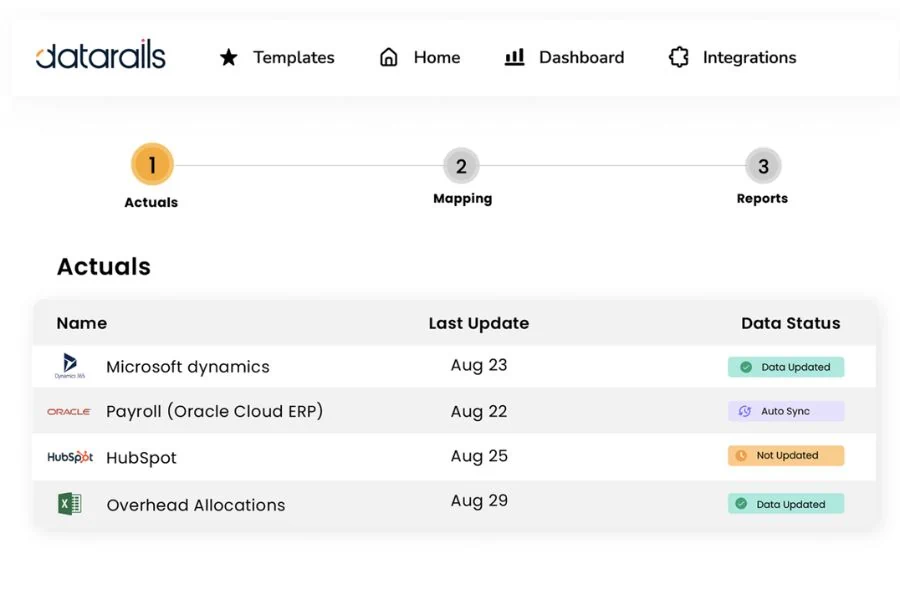
DataRails is a financial planning and analysis (FP&A) platform designed primarily for Excel users. It offers an intuitive interface that simplifies consolidating, reporting, and planning data.
Key Features:
- Excel Integration: DataRails works with Excel, allowing users to directly consolidate and analyze data from various sources within their spreadsheets.
- Financial Reporting and Planning: The platform automates management reporting and planning, enabling finance teams to streamline processes and improve accuracy.
- Granular Budgeting: DataRails supports granular-level planning, which can enhance financial budgeting and forecasting accuracy.
Pricing:
While specific pricing details are not provided, TheFinanceWeekly reports that Datarails is currently starting at $2,000/month plus implementation costs for small teams. It’s recommended to contact DataRails directly for the most current pricing information.
Unique Selling Points:
- Ease of Use: DataRails is praised for its user-friendly interface and the simplicity of performing basic tasks.
- Excel Compatibility: The platform’s compatibility with Excel is one of its main selling points, as it allows users to leverage familiar tools while benefiting from added functionalities.
- Scalability: According to reviews, DataRails scales easily and integrates well with other systems, making it suitable for businesses of various sizes.
Who is it best for?
DataRails is best suited for businesses relying heavily on Excel for their financial planning and analysis. It is suitable for startups, small businesses, and medium-sized companies. Its features are particularly beneficial for finance teams looking to automate their reporting and planning processes, consolidate data more efficiently, and improve the accuracy of their budgeting and forecasting.
2) Cube FP&A
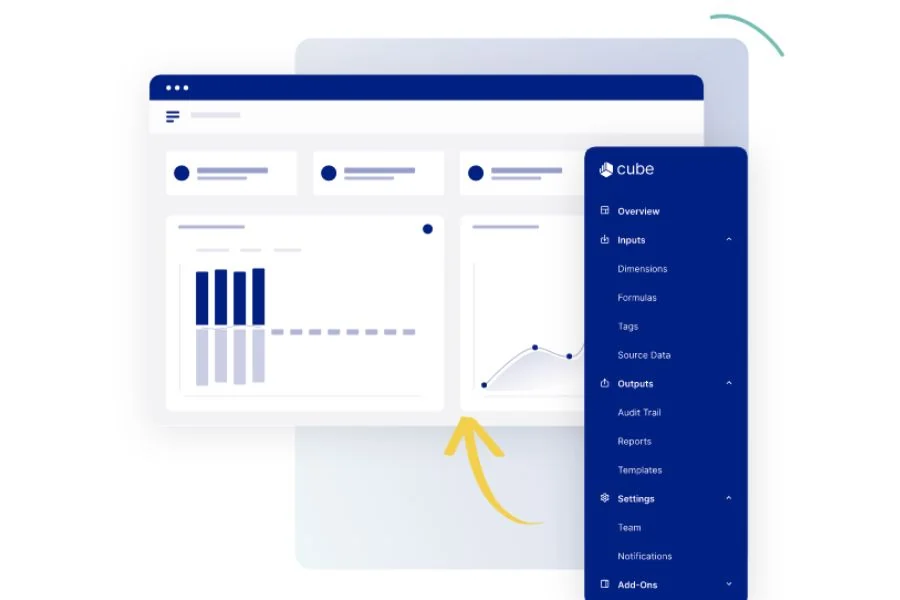
Cube Software is a financial planning and analysis (FP&A) solution designed to streamline financial forecasting, workflow management, and budgeting processes for businesses.
Cube promises to keep what you love about spreadsheets and automate what you don’t.
Key Features:
- Spreadsheet-native: Cube is a spreadsheet-native FP&A platform that integrates seamlessly with your existing spreadsheets, making it easy for anyone to adopt and use.
- Real-time Data Access: It provides real-time financial and operational data access, enabling faster and more efficient financial planning and analysis.
- Multi-Scenario Planning: Cube helps strategic finance teams build multi-scenario plans, track performance, and drive business decisions using real-time data.
- Interface and Script Execution: Cube Base includes the interface, and Cube Voyager executes scripts, allowing for a wide range of data manipulation and analysis.
Pricing:
Three different plans with increasing features ranging from $1,250/month to $3,750/month.
Unique Selling Points:
Cube’s unique selling point is its ability to embrace your existing spreadsheets instead of replacing them. This makes it easier to adopt and reduces the learning curve for teams already accustomed to working with spreadsheets. It also offers robust scenario management, allowing teams to manage multiple scenarios effectively.
Ideal For:
Cube Software is ideal for FP&A teams looking for a tool to enhance their current spreadsheet practices rather than replace them. It is suitable for startups, small businesses, and medium size companies that require efficient financial planning and multi-scenario analysis. It’s especially beneficial for companies wanting to make strategic decisions based on real-time financial and operational data.
3) Workday Adaptive Planning

Workday Adaptive Planning is a financial planning and reporting tool that provides budgeting, forecasting, reporting, and analytics for businesses of all sizes. It embeds AI and machine learning at its core, allowing organizations to use advanced financial forecasting methods.
Key Features:
- AI and ML Integration: Workday integrates artificial intelligence and machine learning at its core, enabling organizations to make informed decisions quickly and adapt as circumstances evolve.
- Automated Budgeting and Forecasting: The platform includes automated financial budgeting and forecasting capabilities, reducing the manual effort involved in these processes and increasing accuracy.
- Financial Reporting: Workday offers robust financial reporting and management reporting capabilities, providing businesses with critical insights into their financial performance.
- Integration Capabilities: The software can integrate with third-party products like Salesforce, enhancing its utility and flexibility.
Pricing:
While Workday doesn’t release pricing for its financial forecasting software, competitor OnPlan reports that licenses start at $15,000 per user per year.
Unique Selling Points:
- Adaptability: As its name implies, one of the key selling points of Workday is its adaptability. The platform enables an active planning process that incorporates everyone in the organization, making it easier for companies to adapt to changing business conditions.
- Efficiency: Workday Adaptive Planning automates manual processes, including workforce planning, enhancing decision-making through dynamic reporting, and delivering financial insight for enterprises. This streamlining of financial planning processes boosts productivity.
- Ease of Use: By managing intricate financial models without cumbersome spreadsheets or outdated on-premise systems, Workday eliminates tedious and error-prone tasks for finance teams.
Who is it best for?
Workday Adaptive Planning suits many businesses, from small companies to large corporations. Its ability to provide a comprehensive budgeting, forecasting, and reporting solution makes it particularly beneficial for businesses looking to improve their financial planning processes and make more informed decisions.
4) Planful
Planful, formerly known as Host Analytics, is a cloud-based financial performance management software designed for financial planning and analysis (FP&A) teams. The platform streamlines business-wide planning, budgeting, consolidations, reporting, and visualization, allowing CFOs and their teams to align strategic business objectives effectively.
Key Features:
- Financial Applications: Planful includes financial applications for modeling, planning, consolidation, and reporting, making it a comprehensive tool for financial management.
- Excel Integration: The suite offers excellent Excel integration, simplifying the planning process and reporting for users familiar with the Microsoft product.
- Cloud-Based Platform: Being a cloud-based platform, Planful allows for real-time collaboration and access to data from anywhere at any time.
Pricing:
According to competitor Cube Software, Planful starts at $1,250/month for lean finance teams and $2,450/month for companies looking to scale.
Unique Selling Points:
- User-Friendly: According to reviews, Planful is user-friendly and does not require extensive coding knowledge, making it accessible to many users.
- Customer Service: Planful is known for its good customer service and receptiveness to customer feedback, contributing to a positive user experience.
- Efficiency: The platform helps streamline the financial planning process, improving efficiency and accuracy in planning, closing, and reporting.
Who is it best for?
Planful is used by more than 1,000 customers globally, including notable names such as Boston Red Sox, Del Monte, TGI Friday’s, and 23andMe. It’s suitable for FP&A teams looking to enhance their efficiency and productivity across the end-to-end FP&A process.
5) Jirav
Jirav is a cloud-based financial planning and analysis (FP&A) software designed to help businesses streamline their budget process, financial forecasts, and goal alignment. It’s built by finance professionals for finance professionals, promising to deliver insights faster than any other solution available.
Key Features:
- Data Integration: Jirav allows users to combine accounting, workforce, and operational data in a driver-based financial model, providing a comprehensive view of the business.
- Ready-to-Use Templates: The platform offers ready-to-use templates to simplify financial planning and analysis.
- Vivid Data Visualization: Jirav provides robust data visualization capabilities, making it easier for businesses to interpret and present their financial data.
- Historical Data Tracking: The software is designed to examine historical data, enabling businesses to make informed decisions based on past trends.
Pricing:
According to Jirav, the standard plan starts at $10,000 per year and a customized plan starts at $15,000 per year.
Unique Selling Points:
- User-Friendly: Jirav is known for its user-friendly interface and ease of use, making it accessible to finance professionals at all levels.
- Efficiency: The platform streamlines FP&A processes, helping teams to create accurate forecasts and surface sales insights quickly.
- Collaboration: Jirav makes collaboration easy, driving faster insights across the entire company.
Who is it best for?
Jirav is suitable for businesses of all sizes looking for a comprehensive solution for their financial planning and analysis needs. It’s particularly beneficial for FP&A teams that need to create accurate forecasts, report on financials, and model future business activities to drive growth.
6) Budgyt
Budgyt is a cloud-based budgeting software designed to provide a comprehensive solution for businesses, nonprofits, and larger organizations. It’s developed to streamline workflows across multiple departments, allowing several users to work simultaneously.
Key Features:
- Multi-Department Budgeting: Budgyt allows for multi-department budgeting, as well as zero based budgeting, making it easier for businesses to keep track of their finances across different teams or departments.
- Cloud-Based Platform: As a fully cloud-based tool, Budgyt enables users to access their future budgets from anywhere at any time.
- User-Friendly Interface: Budgyt has a user-friendly platform that simplifies record keeping, making it accessible to users with varying levels of technical expertise.
- Built-In Reports: The software comes equipped with built-in reports, providing instant answers and insights into the organization’s financial status.
Pricing:
Budgyt has three pricing levels, Easy, Plus, and Pro based on the number of departments to forecast and the features. According to G2, pricing starts at $399/month for the entry-level plan.
Unique Selling Points:
- Streamlined Workflows: Budgyt is built to streamline the workflows of multiple departments, enhancing efficiency and productivity.
- Transparency: The platform provides a transparent overview of financial results, making it easier for businesses to track and understand their financial performance.
- Collaboration: With its cloud-based nature, Budgyt facilitates collaboration, allowing multiple users to work on the budgeting process simultaneously.
Who is it best for?
Budgyt is suitable for small to medium-sized businesses, nonprofits, and larger organizations looking for a comprehensive and user-friendly business budgeting solution. It’s particularly beneficial for businesses looking to streamline their budgeting processes and enhance collaboration among their teams.
7) Oracle Hyperion Planning
Oracle Hyperion Planning is a centralized web-based planning, budgeting, and forecasting solution that integrates financial and operational planning processes. It’s designed to improve business predictability by providing a detailed view of business operations and their related impact on financials.
Key Features:
- Centralized Database: Hyperion Planning uses a centralized database that allows users to input and access data in real-time. This feature enables all parts of a business to stay connected and informed.
- Budgeting and Forecasting: Hyperion Planning provides robust budgeting and forecasting capabilities. The software allows for rolling forecasts and what-if modeling, which can help businesses prepare for various future scenarios.
- Financial Consolidation Integration: Hyperion Planning integrates with Oracle Hyperion Financial Management for financial consolidation. This feature allows for seamless data transfer between the two applications, ensuring consistency and accuracy.
- Workflow Process: Hyperion Planning offers a workflow process that includes a Planning Unit Hierarchy, Scenario and Version Assignment, and Manage Approvals. This workflow helps to streamline the planning process and ensures all relevant parties are involved.
- Reporting Templates: Hyperion Planning comes equipped with reporting templates for data analysis, making it easier for businesses to interpret data and make informed decisions.
Pricing:
Hyperion Planning is enterprise software for large companies and comes with a big (and unpublished) price tag based on each company’s unique needs.
Unique Selling Points:
- Integration Capabilities: One of the key selling points of Hyperion Planning is its ability to integrate with other Oracle solutions. This feature gives businesses a unified platform for their financial management needs.
- Robust Modeling Framework: Hyperion Planning provides a robust modeling framework that facilitates reliable financial forecasts based on sales and operational assumptions.
- User-Friendly Interface: Despite its advanced features, Hyperion Planning is known for its user-friendly interface, which makes it accessible to users with varying levels of technical expertise.
Who is it best for?
Oracle Hyperion Planning is suitable for medium to large businesses that need a robust and integrated planning, budgeting, and forecasting solution. Organizations already using Oracle solutions may find Hyperion Planning particularly beneficial due to its integration capabilities with the accounting system and management reporting.
8) Anaplan
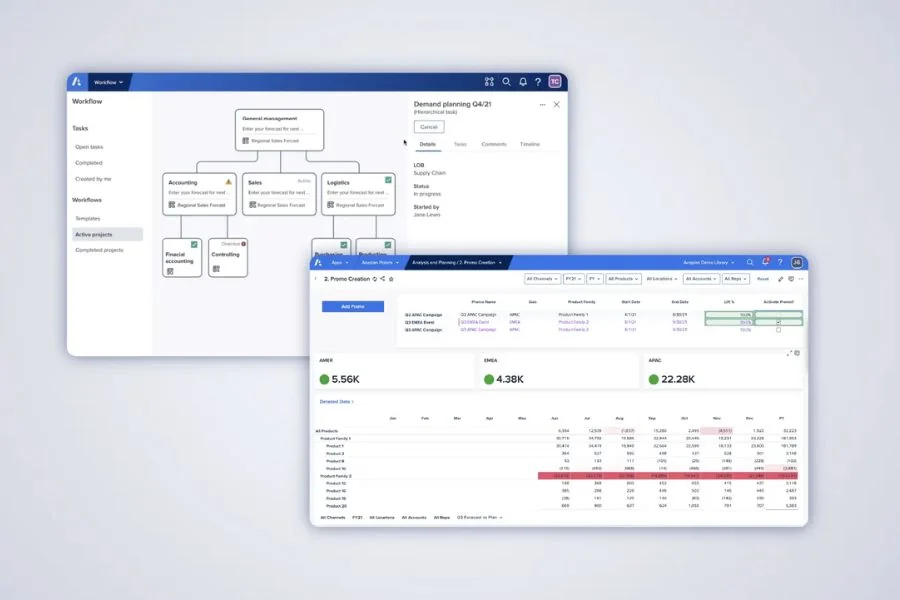
Anaplan is a powerful, cloud-based business planning platform that enables businesses to make better-informed decisions by connecting data, people, and plans across the business. It’s designed to serve various industries and departments, including finance, sales, supply chain, HR, and marketing.
Key Features:
- Connected Planning: Anaplan’s main selling point is its real-time ability to connect data, people, and plans. This feature allows for consistent forward momentum and agile execution across an enterprise.
- Proprietary Hyperblock™ technology: Anaplan uses this technology to provide multi-dimensional modeling capabilities, allowing businesses to create complex models that reflect their unique structures and planning needs.
- Scalability: Anaplan can easily scale to accommodate business size or complexity changes, making it a suitable choice for both small and large enterprises.
- Integration Capabilities: Anaplan can integrate with various other systems, providing a unified platform for all business planning and decision-making processes.
Pricing:
Anaplan does not publicly disclose its pricing. Online reviewers have noted that pricing starts between $30,000-50,000 annually and increases from there.
Unique Selling Points:
One of Anaplan’s unique selling points is its proprietary Hyperblock™ technology, which allows for multi-dimensional modeling. This technology enables businesses to build sophisticated models that reflect their unique structures and planning needs.
Another unique selling point is Anaplan’s focus on connected planning. By integrating data, people, and plans in real-time, Anaplan helps businesses maintain momentum and execute strategies more agilely.
Who is it best for?
Anaplan is best for businesses of all sizes that need a robust, flexible planning solution. It suits businesses with complex structures or requiring sophisticated modeling capabilities. Anaplan can serve various departments, so it’s also a good choice for businesses that want to consolidate their planning processes onto one platform.
9) Onplan
OnPlan is a financial planning application designed to streamline sales forecasting and budgeting operations for small to midsize businesses. The platform provides powerful planning, budgeting, and forecasting capabilities, layered with visualization and integration features.
Key Features:
- Financial Modeling: OnPlan helps visualize all your financial and operational data, rapidly assembling new visualizations combining data across your financial model and scenarios.
- Sales Forecasting and Budgeting: With OnPlan, businesses can streamline their sales forecasting and budgeting operations, improving efficiency and accuracy in revenue forecasting.
- Financial Reporting: OnPlan offers robust financial reporting capabilities, providing businesses with critical insights into their financial performance.
- Data Integration: OnPlan integrates with key operational and financial data sources such as Quickbooks, Intacct, NetSuite, Salesforce, Hubspot, and more, enhancing its utility and flexibility.
Pricing:
OnPlan has three levels: Essentials, Growth, and Growth+. Pricing starts at $12,500 per year for the entry-level version.
Unique Selling Points:
- Fast and Flexible: OnPlan is known for its speed and flexibility, delivering rapid insights and adapting to the unique needs of each business.
- What-If Scenarios: The platform supports the creation of financial models using what-if scenarios and SaaS benchmarks, allowing businesses to prepare for various potential outcomes.
- Data Visualization: OnPlan’s data visualization capabilities make it easier for businesses to interpret and present their financial data.
Who is it best for?
OnPlan is suitable for small to midsize businesses looking for a comprehensive solution to streamline their sales forecasting and budgeting operations. It’s particularly beneficial for businesses looking to improve their financial planning processes and create accurate projections for board meetings and financial modeling needs.
10) Vena Solutions
Vena Solutions is a comprehensive financial planning and analysis (FP&A) software designed to power your finance, operations, and business growth. It’s built to streamline various financial operations, offer insightful analysis, and facilitate effective planning.
Key Features:
- Excel Integration: Vena Solutions fully embraces Excel, transforming it into a complete financial forecasting software by adding features such as data integrations, drill throughs, and advanced forecasting models.
- Complete Planning Platform: As the only Complete Planning platform that empowers and inspires business leaders and finance and operations professionals, Vena Solutions has established itself as a key component of FP&A teams.
- Collaborative Approach: Vena advocates for collaboration, ensuring finance-led planning stays in finance while fostering teamwork across different departments in an organization.
Pricing:
Vena offers two tiers, Professional and Complete. Customers report high add-on fees for implementation, coding, and a system administrator.
Unique Selling Points:
- Native Excel Solution: Vena is the only native Excel Complete Planning Platform, making it an optimal choice for organizations relying heavily on Excel for their mission-critical processes.
- Usability: As attested by reviews on Gartner, the usability of Vena has made it a vital part of many businesses’ FP&A operations.
- Scalability: Vena Solutions provides many options for reporting and analysis at smaller organizations, with the potential to scale as the business grows.
Who is it best for?
Vena Solutions is suitable for businesses of varying sizes looking for a comprehensive solution to streamline their financial planning and analysis operations. It’s particularly beneficial for finance and operations professionals aiming to enhance their financial planning processes and drive business growth.
11) IBM Planning Analytics
IBM Planning Analytics is a robust, AI-powered business performance management software designed to automate your planning, budgeting, forecasting, and analysis processes. It offers a comprehensive solution for businesses of all sizes seeking to improve their decision-making capabilities and drive more intelligent workflows.
Key Features:
- AI-Powered Planning: IBM leverages AI technology to automate planning, budgeting, and forecasting, enabling businesses to deliver faster, more accurate financial forecasts.
- Flexible Deployment: The software can be deployed on the cloud, on-premises, or hybrid, providing flexibility based on a business’s specific needs.
- Integration with Excel: It allows users to analyze financial data from multidimensional planning models in the familiar Microsoft Excel interface, making it user-friendly and easy to adopt.
- Customizable Dashboards and Reporting: IBM provides customizable dashboards and reports that offer valuable insights into business performance and trends.
Pricing:
IBM is enterprise software for large companies and comes with a big (and unpublished) price tag based on each company’s unique needs.
Unique Selling Points:
- AI-Powered Analytics: One of the key selling points of IBM is its use of AI to automate and enhance planning and forecasting processes.
- Flexible Deployment Options: Its ability to be deployed on the cloud, on-premises, or in a hybrid environment offers businesses flexibility and control over their data.
- Excel Interface: The integration with Microsoft Excel makes it easy for users to adopt and utilize, especially for those already familiar with Excel.
Who is it best for?
IBM Planning Analytics is suitable for businesses of all sizes across various industries. It’s particularly beneficial for organizations that require an efficient, flexible, and AI-powered solution for their planning, budgeting, and forecasting needs.
Benefits Of Budgeting And Forecasting Software
So, what makes budgeting and forecasting software so crucial? Well, here are a few reasons:
Time-saving: Remember those days of manually entering data into spreadsheets? With budgeting software, those days are long gone. Automated data entry saves hours, even days, of work, freeing up your team to focus on strategy and execution.
Accuracy: Human error is inevitable, especially when dealing with complex data sets. Budgeting software significantly reduces these errors, providing more accurate and reliable forecasts.
Real-time Updates: The business world moves fast, and so should your financial planning. These software products offer real-time updates, allowing you to adjust your plans as market conditions change.
Collaboration: These tools allow for seamless collaboration among team members. Everyone can access and contribute to the budget, fostering a more inclusive and comprehensive approach to financial planning.
Before we dive in, let me share a personal anecdote. I worked with a small business struggling with its financial planning a few years ago. They spent countless hours on their budget, only to have inaccurate forecasts. Once they implemented budgeting and forecasting software, they saved time, reduced errors, and gained valuable insights leading to smarter business decisions. Today, they’re thriving.
Remember, knowledge is power. And in the business world, that knowledge often comes from understanding your finances. So, consider investing in budgeting and financial forecasting software. It could be the key to unlocking your business’s full potential.
Choosing The Perfect Software For Your Business
When it comes to budgeting and forecasting software products, there are a lot of options out there. Researching and finding the tool that best suits your needs is important. What works for one business may not be right for another, so make sure you understand what each program offers before deciding.
Key Features to Look for in Financial Planning Software
When evaluating a budgeting and forecasting software solution, consider these key features:
- Ease of use: Look for intuitive interfaces and user-friendly design. The less time you spend learning the tool, the more time you can spend analyzing the data.
- Integration capabilities: The software should integrate seamlessly with your existing systems (like your integrated accounting software, reporting software, CRM, or project management software) to pull real-time data.
- Customization: Every company has unique needs. Choose software to customize reports, budgets, and forecasts to match your requirements.
- Scalability: Your budgeting and forecasting needs will evolve as your company grows. Choose a tool that can scale with your business.
- Security: Your financial data is sensitive. Make sure the software provides robust security features to protect your data.
Evaluating Budget Forecasting Software
Once you’ve identified what you need in a budgeting and forecasting tool, compare different software options. Most providers offer free trials, so take advantage of this to test out the software. Look at the tool’s functionality, ease of use, and customer support. Also, consider the provider’s reputation and track record.
Quick Recap
Budgeting and forecasting software can help your organization predict future financial needs. When choosing a tool, look for features like ease of use, integration capabilities, customization, scalability, and security. Be sure to carefully evaluate different options before selecting and planning out the implementation process. With the right budgeting and forecasting software, you can make informed decisions to guide your business into the future successfully.
Have any questions? Are there other topics you would like us to cover? Leave a comment below and let us know! Make sure to subscribe to our Newsletter to receive exclusive financial news right to your inbox.