

13 Best FP&A Software Solutions For 2024

Are you a Financial Planning And Analysis (FP&A) professional looking for the best software?
Look no further! I’ve tested, researched, and compiled a list of the top FP&A software on the market. From budgeting and forecasting tools to analytics dashboards, this article has everything you need to make informed decisions about your business. My comprehensive list will help you find the perfect solution for your needs.
With our selection of FP&A software tools, you can easily manage budgets, create forecasts, track performance metrics, and more. You’ll be able to quickly identify trends in data so that you can make better decisions faster than ever before. These solutions are easy-to-use with intuitive interfaces that allow even novice users to get up and running quickly.
Read this blog post now to learn more about my top picks for FP&A software!
My #1 Favorite FP&A Tool
Datarails
Best All-Around Financial Analysis Software
Special Offer: F9 Finance readers get 2 free seats added to their subscription
★★★★★
Datarails is a financial planning and analysis platform that automates financial reporting and planning while enabling finance teams to continue benefiting from Excel’s familiar spreadsheets and financial models.
What Is The Best FP&A Software?
Here is my carefully curated list of the best FP&A software I could find:
1) Datarails
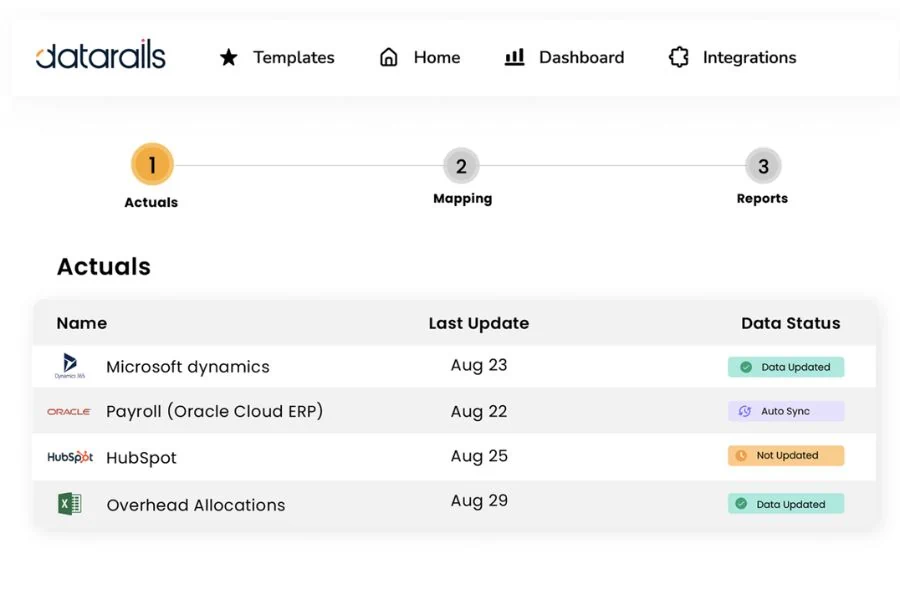
Best All Around FP&A Software
Datarails is a financial planning and analysis platform that automates financial reporting and planning while enabling finance teams to continue benefiting from Excel’s familiar spreadsheets and financial models.
Automating these time-consuming manual processes paves the way for finance teams to spend more time analyzing data and less time gathering it. And it empowers them to answer essential strategic questions like what their organization can do to increase revenue and reduce expenses.
Key Features:
- Dynamic Financial Reports
- Data Upload & Automatic Consolidation
- Real-Time Financial Forecasting
- Smart Financial Analysis & Insights
- Integration with Third-Party Systems
Pricing:
While specific pricing details are not provided, TheFinanceWeekly reports that Datarails is starting at $2,000/month plus implementation costs for small teams. It’s recommended to contact DataRails directly for the most current pricing information.
Who Is It For?
Datarails is designed to support mid-market companies, especially those relying heavily on Excel for their financial planning and analysis. Its features are particularly beneficial for finance teams looking to automate their reporting and planning processes, consolidate data more efficiently, and improve the accuracy of their budgeting and forecasting.
2) Cube
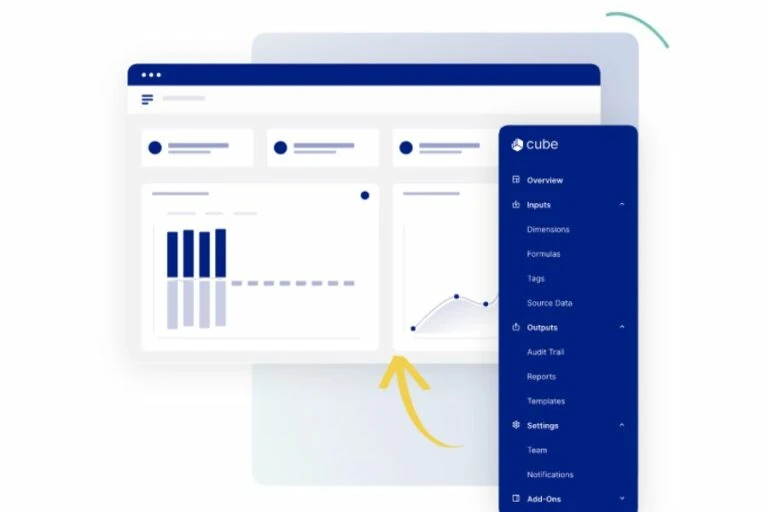
Cube promises to keep what you love about spreadsheets and automate what you don’t.
Analyze instantly – Streamline manual data, reduce errors, and drill down so you can make smarter business decisions in a fraction of the time.
Plan confidently – Create accurate reports in seconds. Move faster with Cube—automate, actualize, and control with the click of a button.
Collaborate seamlessly – Cube lets you access data from the spreadsheet, making it easy for anyone to use and adopt. Get peace of mind with user controls and audit trails.
Key Features:
- Automated data consolidation
- Scenario analysis
- Customizable dashboards
- Centralized formulas and KPIs
- Integration with Microsoft Excel and Google Sheets
Pricing:
Three plans with increasing features range from $1,250/month to $3,750/month.
3) Microsoft Excel
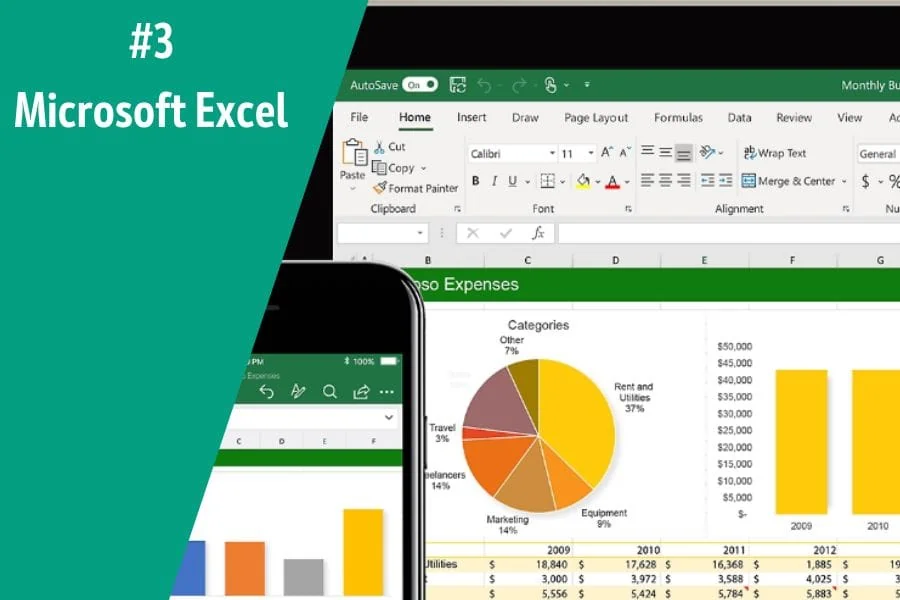
Best For Price, Flexibility, And Ease Of Use
Microsoft Excel is the go-to tool for finance professionals. It’s an incredibly powerful program that can be used to manage data, create models, and analyze financial performance.
Key Features:
- Formulas and functions
- Pivot tables and charts
- Data analysis and visualization tools
- Integration with third-party services
Pricing:
The Office 365 subscription includes Microsoft Excel, which starts at $6.00/month.
4) Causal

Build models effortlessly, connect them directly to your data, and share them with interactive dashboards and beautiful visuals.
Causal is an end-to-end Financial Modelling platform that helps you build, test, and deploy Financial Models quickly and reliably. With Causal’s easy-to-use interface, Financial Analysts can build models faster while maintaining accuracy.
Key Features:
- Model simulations & optimizations
- Powerful collaboration tools
- Data integration & visualization
- Model versioning & audit trails
Pricing:
Free plan for limited functionality, $250/month for small companies, and enterprise plans for larger organizations
Get Started With Causal
5) Jirav
FP&A is faster and easier than ever before. Traditional FP&A solutions are too complex and expensive for today’s growth companies, while Excel is too fragile, frustrating, and cumbersome. Jirav simplifies FP&A and delivers the insights you need faster than any solution available.
Leave the pains of Excel behind with a purpose-built solution that shifts the complexity of FP&A from the user to the technology. Learn why Jirav sets the standard for “all-in-one” financial planning and analysis.
Key Features:
- Unified, Driver-Based, Dynamic Planning Platform
- Customizable Financial Reports
- Advanced Business Analytics & Dashboards
- Integration with Third-Party Systems
Pricing:
Jirav has a range of plans, starting at $10,000 a year. This solution is targeted at growth companies, not so much small businesses.
6) Clockwork
Clockwork gives you real-time CFO-level insights to save you the pain of manually having to deal with finances and cash flow.
Your business’ finances and cash flow at a glance, automatically

Instant AI-powered projections and forecasts. High-level dashboard to see your business’s financial health in real-time. Easy to understand and update graphs and charts.
Real-time weekly and monthly cash flow forecasts, up to 52 weeks out
Clockwork learns your business’s unique cash timing behavior to forecast your cash flow accurately. Adjust your upcoming and overdue invoices and bills with a click to see the impact on your cash forecast. Will you need to cut costs? Get a loan? Investment? Instantly see your options.
Key Features:
- Accurate Financial Forecasting
- Visual Financial Dashboards
- In-Depth Business Intelligence Insights
- Integrated Invoicing & Billing
Pricing:
$239/month for the Core plan and $639/month for the Pro plan
Get Started With Clockwork:
7) Budgyt
Budgyt is a dynamic FP&A platform that simplifies budgeting, forecasting, and reporting without sacrificing the granular details. Budgyt delivers user-friendly solutions for complex financial planning needs, making it easy for CFOs and finance teams to integrate relevant financial data, streamline processes, and manage multiple departments and users from a single source of truth.
With Budgyt, users can have the confidence to build and monitor budgets that accurately reflect their current financial situation. Financial professionals can take control of budgeting and forecasting processes with industry-leading features like automated data loading, integrated analytics, dynamic drill-downs, multi-department collaboration, custom forms & templates, and more.
Key Features:
- Multi-Department Collaboration
- Integrated Financial Analytics
- Data Automation & Consolidation
- Powerful Business Intelligence Tools
- Custom Forms & Templates
Pricing:
Budgyt starts at $499 per month for the “Easy Plan”, with larger plans costing up to $1399 per month.
8) Limelight
Limelight is a budgeting, forecasting, and reporting software solution allowing users to upload spreadsheets, identify variances, uncover growth opportunities, and optimize business performance.
Budget managers use Limelight to plan and forecast by designing and managing their own budget sheets with our user-friendly interface. They collaborate across departments in real time and create automated financial and comparative reports.
Executives & Management use Limelight to analyze trends in the business and identify growth opportunities and cost savings, monitor cash flow, and much more.
Key Features:
- Real-Time Financial Modeling
- Data Upload & Automation
- Dynamic Financial Insights & Business Intelligence Reports
- Multi-Department Collaboration
- Custom Dashboards & Reports
Pricing:
Limelight pricing is customized based on the plan level and the number of users for your organization.
9) Workday Adaptive Planning

Workday Adaptive Planning is a comprehensive financial planning and reporting tool pivotal in driving enterprise-wide business planning. This cloud-based platform, founded in 2003, has gained recognition for helping organizations plan smarter and report faster.
Key Features:
Adaptive Planning’s core features revolve around budgeting, forecasting, and reporting. It boasts of automated budgeting and forecasting, streamlining the often tedious process of financial planning. Additionally, it provides an array of analytics for businesses of all sizes, thus allowing them to make data-driven decisions. The web-based system makes it accessible from anywhere, enhancing its user-friendly appeal.
Adaptive Planning offers manufacturers a specialized financial planning solution that merges financial and operational data, improving financial reporting, operating plans, workforce planning, and production. With FP&A dashboards and self-service reporting, users can easily visualize their financial data and generate reports as needed.
Pricing:
While Workday doesn’t release pricing for Adaptive Planning, competitor OnPlan reports that licenses start at $15,000 per user per year.
Best For:
Workday Adaptive Planning suits many businesses, from small startups to large enterprises. Its dynamic nature allows it to be used across various industries, including manufacturing. Moreover, it offers industry-leading solutions, making it a go-to tool for businesses seeking to enhance their financial planning and reporting processes.
10) MODLR
Traditional financial and operational planning is too disconnected, overly complicated, and too manual for growing businesses. For efficient and effective planning, you need an easy, powerful, and fast solution.
MODLR is business modeling and collaborative planning software that provides everything needed to enable a connected financial planning process. Financial planners can seamlessly build and share business models and scenario plans and collaborate on budgeting and forecasting activities.
Key Features:
- Structured And Dynamic Planning
- Multi-Department Collaboration
- Advanced Financial Analytics
- Data Automation & Consolidation
- Custom Reports & Dashboards
Pricing:
MODLR pricing is customized based on the plan level and the number of users for your organization.
11) DriveTrain
Drivetrain is a next-generation financial planning, monitoring, and decision-making platform. Our cross-departmental software helps teams build integrated plans, budgets, and forecasts, track their progress against targets in real-time, and identify bottlenecks to growth.
Drivetrain consolidates financial and operational data from over 200 enterprise resource planning and business systems such as Salesforce, NetSuite, Quickbooks, Workday, and Looker to create a single source of truth and simplify business performance measurement.
Drivetrain powers several category leaders, giving them a forward-looking view of their business to make faster, confident decisions.
Key Features:
- Financial Modeling & Forecasting
- Financial Close Management
- Financial Automation & Consolidation
- Business Performance Measurement
- Financial Analytics & Strategic Insights
Pricing:
Drivetrain pricing is customized based on the level of plan and the number of users for your organization
12) Pigment
Pigment’s powerful modeling engine and intuitive user interface empower large organizations to plan faster and easily make data-driven decisions.
Pigment combines inputs from all your business apps (Netsuite, Workday, Bamboo HR, Greenhouse, Looker, Snowflake, and more) and lets you clean and enrich data in seconds.
With Pigment, you can run comprehensive what if scenario planning in minutes, easily change assumptions, and compare scenarios via beautiful tables and waterfall charts.
Financial performance models can be viewed in graph form or on interactive dashboards, allowing users to identify trends and problems quickly.
Key Features:
- Complete Planning Platform
- Financial Reports & Statements
- Scenario Planning
- Business Performance Measurement
- Financial Analytics & Strategic Insights
Pricing:
Pigment has three plans: Essentials, Professional, and Enterprise. You can contact Pigment directly for pricing sized to your organization’s users.
13) Anaplan
Traditional planning, just like siloed systems and point solutions, is outpaced by change. Anaplan for Finance connects your people, data, and plans across your organization to empower the right decisions quickly via continuous planning.
Anaplan can connect operational and sales planning with financial planning, enabling better decisions, tighter business processes, and more accurate forecasts.
Key Features:
- Centralized drivers and KPIs
- Highly customizable, doesn’t rely on IT support
- Role-based security for access control
- Integrate business planning with financials
- Financial Modeling & Forecasting Capabilities
- Financial Automation & Consolidation
Pricing:
Anaplan is highly customized; contact their sales team for pricing to meet your organization’s needs.
What Is The Function Of FP&A?
Picture this: You’re setting out on a road trip. You’ve got your snacks, favorite playlist, and the open road ahead. But before you set off, you make sure to plug your destination into your GPS. Why? Because you need a plan to get where you’re going, right?
Well, in the world of business, Financial Planning & Analysis (FP&A) is like your trusty GPS. It’s about more than just counting beans or crunching numbers. FP&A gives you the roadmap for your business journey, showing you where you’re headed financially and helping you steer clear of any potential potholes.
In a nutshell, FP&A professionals help achieve corporate financial goals. They analyze financial data, advise business leaders, and plan future business performance. It’s like the crystal ball of your business, helping you predict what’s coming down the pike so you can make informed decisions.
How Does FP&A Add Value?
FP&A adds value to a company by providing accurate and timely information to help make better business decisions and support strategic planning. FP&A can provide companies with a more efficient way of managing their resources and understanding current and upcoming trends in the market that could affect their bottom line.
Additionally, FP&A is a leader in corporate performance management and integrated business planning, helping identify areas of potential savings or improvement opportunities. Many FP&A teams are involved in workforce planning and enterprise business planning as they have a broader view of the organization than other teams.
What Kind Of Software Does FP&A Use?
FP&A software is designed to facilitate this process by providing all the tools and analytics necessary for informed decision-making. This includes budgeting, forecasting, data visualization, and reporting. The best solutions offer an intuitive interface that allows users of any skill level to get up and running quickly.
FP&A teams can efficiently and accurately craft strategies to ensure the organization’s financial health is top-notch by utilizing advanced software tools.
The best software for FP&A professionals and teams to use helps them manage their data, create accurate financial forecasts, analyze key performance indicators (KPIs), automate manual tasks, streamline processes, and more.
With powerful analytics tools, finance leaders can quickly evaluate financial performance and make better-informed decisions. Various options, from cloud-based to on-premise solutions, are available to meet any organization’s needs.
What Are the Benefits of FP&A Software?
FP&A software helps you to make more informed decisions for your business. With the right solutions, you can easily create budgets and reliable financial forecasts, track performance metrics, and visualize data meaningfully. This allows you to identify trends quickly to act on them before it’s too late.
The best financial planning and analysis software also offers automation capabilities to streamline processes and save time. This means less manual data entry and more time to focus on what matters most: the success of your business.
In addition, FP&A software can help improve accuracy, which is essential in things like regulatory compliance reporting.
What Should I Look For In FP&A Software
Several important features and capabilities must be considered when selecting a software provider. Do you need the ability to create multiple forecasts? Does it have powerful analytics tools? Is it cloud-based or on-premise? Will there be a relatively steep learning curve?
The best FP&A software solutions should also be easy to use, offer scalability, and provide excellent customer service.
How Much Does FP&A Software Cost?
FP&A software prices vary depending on the features and functionality you need. Many software providers offer free versions with limited functionality, while others require a monthly or annual subscription. It’s important to assess the features and affordability of the software to determine if it meets your needs.
Quick Recap
If you’re an FP&A professional or team looking for the best software tools, our comprehensive list of top solutions will help you find the perfect solution for your needs. With our selection of FP&A software, you can easily manage budgets, create forecasts, track performance metrics, and more! Prices vary depending on the features and functionality you need, so research before purchasing.
We hope this guide has helped you find the best FP&A software. Please contact us if you have any questions; we’ll gladly help.
Have any questions? Are there other topics you would like us to cover? Leave a comment below and let us know! Also, remember to subscribe to our Newsletter to receive exclusive financial news in your inbox. Thanks for reading, and happy learning!