Claude Artifacts for finance, three things I build with them

Most of the finance work I’ve done over the years didn’t end with the analysis. It ended with the formatting pass. The pivot table was right. The variance math was solid. But before any of it went to a CFO or showed up in a board update, someone had to make it look like a deliverable instead of a working file. That someone was usually me, usually late, usually in a version of the file called “Final_v3_ACTUAL_THIS_ONE.xlsx.”
That last mile is where a lot of finance time goes. Not the thinking. The packaging.
I’ve been using Claude for a while now for writing, frameworks, and prompt-heavy workflows. But Claude Artifacts is different. It’s not Claude answering a question. It’s Claude building something you can hand to someone else without touching it again. When I first saw what it could produce for finance use cases, my immediate reaction was that I’d been leaving a lot of time on the table.
This article covers exactly how it works, what I’ve used it for, and where it fits inside a finance workflow. I’m going to keep this specific. If you’re looking for a general “AI is the future” overview, this isn’t it.
What an artifact is
When you ask Claude a question in a normal conversation, you get a response in the chat window. That’s useful for a lot of things. But it’s still just text in a chat. You copy it somewhere, clean it up, put it in a document, format it to match whatever you’re building. There’s still a manual step between Claude’s output and something presentable.
Artifacts removes that step.
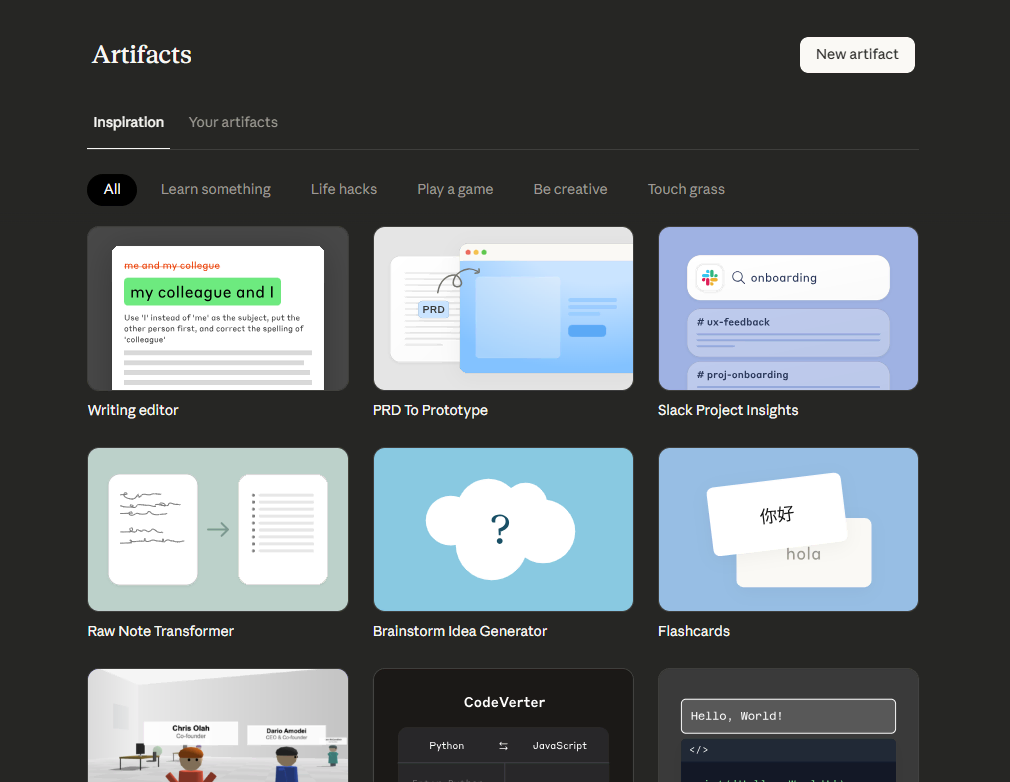
When you trigger an Artifact, Claude generates a standalone output in a separate panel on the right side of the screen. It’s not a response. It’s a deliverable. A formatted document. A live calculator with editable fields. A structured table. A written narrative with headers and sections. The thing itself, ready to use or share, sitting right there while you’re still in the conversation.
The distinction matters because it changes what you are doing. With a regular chat response, Claude is assisting you while you build something. With Artifacts, Claude is building something while you direct it.
For finance work specifically, the use cases cluster around three things: reporting outputs that need to be formatted before they go anywhere, interactive tools that get used in meetings or handed to non-finance stakeholders, and written narratives that wrap around a data set. I’ll walk through each of those in detail in the next section, but the setup is simple enough that you can be running your first Artifact in about two minutes.
There’s no plugin to install. No integration to configure. If you have a Claude account, you have access to this. You open a chat, describe what you want built, and Claude renders it in the side panel. You can iterate on it in the same conversation without starting over. When you’re done, you can copy it, export it, or share it directly.
That’s it. That’s the setup.
Three things I use artifacts for
I want to be specific here, because “AI can help with reporting” is not useful information. What’s useful is knowing exactly what to type, what comes back, and whether it’s worth your time. So let me walk through the three use cases I’ve tested directly, with the prompts I used.
A month-end expense summary from GL data
The starting point for this one is your GL data. You don’t need a clean export or a formatted file. I pasted 20 rows of transaction-level data directly into Claude, columns and all: date, account, description, amount. Then I typed this prompt:
“Using this GL data, build me a monthly expense summary by account category. Format it as a clean report I could present to a CFO. Group by category, show totals, and flag any line that’s more than 20% of total spend.”
What came back in the Artifacts panel was a grouped, totaled, formatted summary report with the flagging logic applied. Not a pivot table. Not a screenshot of Excel. A document that looked like something a person had spent time on.
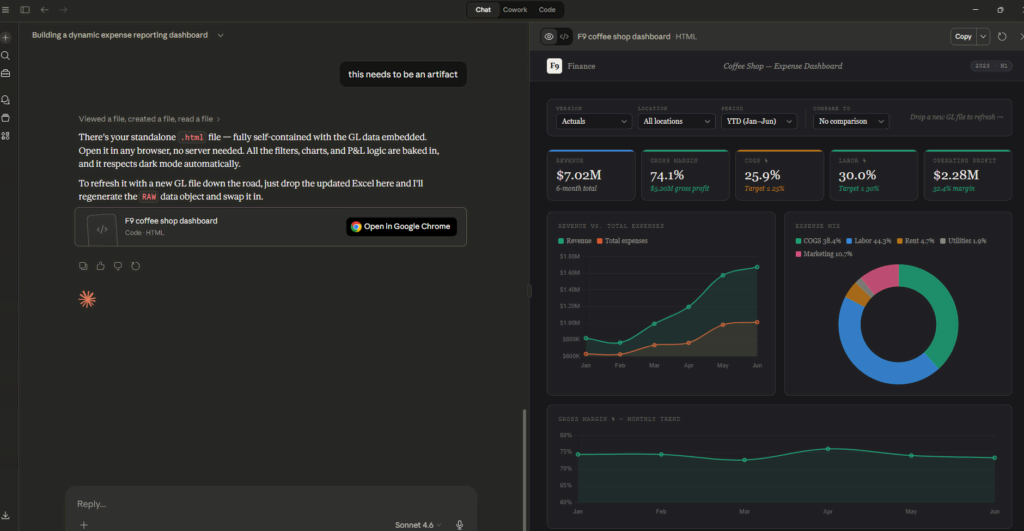
The flagging piece is what I want to highlight. In a normal workflow, that’s a conditional formatting rule, or a helper column with an IF statement, or just someone eyeballing the numbers and hoping they catch the outliers. Here it’s one sentence in the prompt. The output handles it automatically, and because it’s in Artifacts, the formatting is already there. You’re not doing a second pass in Word to make it presentable.
I’ve seen finance managers spend 30 to 45 minutes on this exact task every single month. Not because it’s hard. Because it’s tedious, and tedious things take time regardless of how skilled you are.
[CASE STUDY: Multi-Location Close Workflow]
A finance manager I work with was running month-end close for a multi-location operation. Twelve days to close, consistently. A significant chunk of the back half of that close was summarization work: pulling together location-level data, formatting it for leadership, making sure the output looked like a report rather than a data dump.
After she started using Artifacts for the summarization step, that work moved from the end of the close to inside the close. She wasn’t producing a summary after the numbers were final. She was producing it as the numbers came in, iterating as needed. The CFO-facing document stopped being an Excel screenshot in an email and started being a formatted report that didn’t require a separate Word document pass. She recovered two to three hours on the final day of close. That’s not a small number when you’re already running on fumes by day eleven.
An interactive budget versus actual tracker
This one surprises people, because it feels like it should be more complicated than it is.
I described five expense categories from a coffee shop dataset I use for demos, gave Claude reasonable budget numbers for each one, and typed this prompt:
“Build me an interactive budget vs. actual tracker for these expense categories. I want to be able to type in actual amounts and have it calculate the variance and variance percentage automatically. Make it clean enough to use in a team meeting.”
The Artifacts panel produced a functional calculator. Fields were editable. Variances calculated as I typed. The formatting looked intentional, not like a default table.

Here’s the comparison I keep coming back to when I show this to people: ask yourself how long it takes to build this in Excel properly. Not a quick version. A proper version with labeled columns, formatted percentages, conditional coloring on the variance column, and locked cells so no one accidentally overwrites a formula during the meeting. For most finance professionals, that’s a 45-minute build. Maybe more if you’re doing it from scratch on a template you haven’t touched in six months.
Claude produced it in under 60 seconds.
The Excel version also lives on your desktop. This version is shareable immediately. You can hand it to an operations manager who has never opened a spreadsheet in their life and they can type numbers into it without breaking anything. That’s a different kind of useful.
The executive narrative around the numbers
This is the 9pm task. The board deck is due tomorrow morning. The numbers are finalized. All that’s left is the two-page narrative that contextualizes what happened, explains the variances, and gives leadership something to read before they look at the tables.
I’ve written this document more times than I want to count. It’s not intellectually hard. It’s just time-consuming, and it requires a specific kind of writing that most finance professionals aren’t practicing daily.
For this demo, I described a month of sales performance across three coffee shop locations: transaction volume by week, average ticket size, and the variance between locations. Then I used this prompt:
“Here’s a summary of sales performance across our three coffee shop locations for the past month. Write a one-page executive narrative I could include in a board update. Lead with what’s notable, explain the variance between locations, and end with one forward-looking observation based on the trend.”
What came back read like a finance professional wrote it. Not a template filled in. Not a list of bullet points formatted as paragraphs. An actual narrative with a point of view, context around the numbers, and a closing observation that wasn’t generic.

I still edited it. I adjusted the framing on the location variance and tightened the forward-looking line. But I was editing from something coherent instead of starting from a blank page at 9pm. That difference is significant in a way that’s hard to overstate until you’ve been the person staring at the blank page.
Prompting for finance outputs
The most common failure mode I see when people try this for the first time is prompts that are too vague. “Summarize this data” produces something generic. “Build me a report” produces something that technically qualifies as a report but isn’t useful. The output quality scales directly with the specificity of the input.
Three things move the needle more than anything else for finance use cases.
First, give Claude the audience. “A CFO who will use this in a board meeting” produces a different output than “my team.” Claude calibrates tone, level of detail, and structure based on who’s reading it. If you do not specify, you get something in the middle that works for no one in particular.
Second, name the format explicitly. Don’t say “write something about the variance.” Say “write a one-page narrative” or “build a table with a variance column” or “produce a formatted summary report.” Claude will make a choice if you don’t, and that choice may not be what you need.
Third, include the “so what” you want the output to carry. If there’s a pattern in the data that matters, say it. “We had an unusual spike in labor costs in week three that needs context” gives Claude something to work with. Without that, it reports the numbers without a point of view, which is exactly the document your CFO will read and then ask you to explain anyway.
Here’s the difference in practice. A weak prompt looks like this:
"Here's my expense data. Build a summary." A specific prompt looks like this:
"Here's my GL data for October. Build a monthly expense summary grouped by category, flag anything over 20% of total spend, and format it as a clean one-page report for a CFO review."Same data. Different outputs. The specific version saves you the editing pass.
What a reporting workflow looks like
Let me make this concrete with a scenario I ran using the F9 Finance Coffee Shop dataset I use for demos. It’s a multi-location coffee shop operation with GL transaction data and point-of-sale files across locations. The numbers are clean enough to work with and messy enough to be realistic.
Picture a Monday morning. The weekend POS data is in. The GL has been updated. A manager needs something presentable for a Tuesday ops review, and that something needs to show location-level performance, flag anything worth discussing, and be readable by people who did not spend the weekend staring at the same spreadsheet she did.
The traditional path looks like this: open Excel, pull the POS data, build a pivot table by location, format the table so it doesn’t look like a raw export, calculate the variance from the prior week, add a column for percentage change, copy the whole thing into PowerPoint or a Word doc, add a sentence or two of context above the table, and send. On a good day with no interruptions, that’s 45 minutes to an hour. On a normal Monday morning, it’s longer.
With Artifacts built into that workflow, the path compresses. Paste the relevant data into Claude. Prompt for a grouped summary with variance flagging and CFO-ready formatting. Iterate once if the structure needs adjusting. Prompt again for the executive narrative that wraps around it. Total time from data to a shareable deliverable: under ten minutes.
That’s not a projection. I ran this specific workflow with the F9 Finance Coffee Shop data during demo prep, and the hardest part was deciding which prompt to use first.
The output isn’t perfect on the first pass every time. Sometimes the grouping needs adjustment or the narrative framing is slightly off. But iteration inside Claude is fast. You’re not rebuilding the file. You’re refining the output with a follow-up prompt in the same conversation. “Move the flagged items to the top of the summary” or “make the narrative more direct, lead with the location variance” takes seconds. That’s a different experience than going back into Excel to restructure a pivot table you built fifteen minutes ago.
The part of this that doesn’t show up in the time comparison is what happens to the manager’s Tuesday morning. She walks into the ops review with a formatted report and a written narrative, both produced from the same data set, both ready to use. She’s not explaining a spreadsheet. She’s presenting an analysis. That shift in how the work shows up changes how she shows up in the room.
Stop rebuilding it every month
The artifact prompts, written out in full
The three prompts behind the dashboard, the tracker and the memo generator above, plus the rest of the finance AI library. Free, and it lands in your inbox in about a minute.
Where artifacts still hit a wall
I want to be direct here because I’ve seen too many AI tool overviews bury the limitations in a footnote or skip them entirely. That helps no one. Artifacts is genuinely useful for finance work, and it also has real constraints that will matter for how you use it.
It does not reach into your systems
Artifacts still works with what you give it. There is no live connection to your ERP, your GL software, your BI tool, or your data warehouse, and an artifact cannot call an outside API to go and fetch one. You are either pasting data into the chat or describing it well enough for Claude to work from your description. For a one-time report or a deliverable you’re building manually, that’s fine. For anything that needs to run automatically on a schedule or pull from a live data source, you need a separate data connection layer before Artifacts becomes part of the equation.
That is the boundary to understand before you build a workflow around it.
Complex models still belong in Excel
A multi-scenario DCF with interconnected assumptions, a rolling 18-month forecast with named ranges and version history, a compensation model where fifteen cells talk to each other in ways that took three weeks to build. Artifacts is not replacing any of that.
What it handles is the presentation layer around those models. The summary that goes to the CFO, the narrative that frames the forecast output, the one-page tracker that lets an ops manager update actuals without touching the model. The models live in Excel. The deliverables that come from the models can go through Artifacts.
Output quality tracks input quality
This one applies to every AI tool and it’s worth saying plainly: if the data you paste is messy, the output reflects that. If the context you give Claude is thin, the output will be generic. The thinking still happens on your side. Claude handles the formatting, the structure, and the language. You handle the judgment about what the numbers mean and what the audience needs to understand.
I’ve seen people try a prompt once, get a mediocre output, and conclude the tool isn’t useful. That is usually a prompt problem. The specific prompting guidance in the earlier section isn’t optional. It’s the difference between an output you can use and one you have to rewrite from scratch.
The version of Artifacts that saves you time is the one where you bring good data and a clear prompt. That combination produces something worth having. The version where you paste a raw export and type “summarize this” produces something that looks like AI generated it, which is not what you want going to a CFO.
What changed in 2026, and why it matters more than it sounds
When I first wrote this page an artifact was a deliverable. You built one, you looked at it, you exported what you needed and moved on. Three changes since then turned it into something closer to an internal tool, and the third is the one that matters for a finance team.
Artifacts can call Claude themselves
An artifact can now talk to Claude through an API from inside the artifact. The tracker stops being a static page and starts being something that reasons: paste in this month’s variances and have it write the commentary, in the artifact, without going back to a chat window. Anthropic calls these Claude-powered artifacts.
Whoever uses it pays for it
This is the change that makes sharing viable. When someone opens an app you built and uses it, the usage counts against their Claude subscription rather than yours. You are not funding your whole department’s variance commentary out of your own plan, which was the thing that made sharing a bad idea before.
It remembers, and it has a link
Publishing gives you a URL with no deployment step, and published artifacts get persistent storage on Pro, Max, Team and Enterprise, so a tracker can hold state between visits. Worth knowing that storage only works once the artifact is published; while you are still building and testing it, saves silently do nothing.
Two constraints to plan around. On Team and Enterprise, artifacts can only be shared inside your organization and viewers have to be signed in to that account, which is usually what you want with finance data and occasionally a surprise. And artifacts depend on code execution and file creation being switched on, under Settings then Capabilities for individuals or organization settings for Team and Enterprise. If yours are off, nothing in this article works until an admin turns them on.
How to start this week
This is a practical sequence, based on what works when someone adds a tool to a workflow they are already running at full capacity.
Start with one recurring task
Look at your week and find the output you produce most often that is mostly formatting and presentation rather than analysis. The month-end expense summary. The weekly variance report. The ops update that goes out every Friday. That’s your first use case, because you already know what a good version looks like. You have a standard to compare against, which means you can judge the output instead of guessing whether it is good enough.
Pick that one task. Run it through Artifacts this week. Don’t try to redesign your entire reporting workflow on the first attempt.
Build a prompt template for it
Once you get an output you’re happy with, save the prompt that produced it. Put it somewhere you will find it again, a notes app, a shared doc, a tab in a workbook you open every week. The goal is to stop rebuilding the prompt from scratch each time and start treating it like a reusable tool.
This is how Artifacts moves from an experiment to a workflow component. The first time takes a few iterations. The fifth time takes 90 seconds because you already know what to type.
If you want a starting point, the three prompts I walked through in this article are worth keeping:
- The GL summary prompt: group by category, flag outliers above a threshold, format for a specific audience
- The budget vs. actual tracker prompt: named categories, editable actuals, automatic variance calculation, clean enough for a meeting
- The executive narrative prompt: describe the data, specify the audience, lead with what’s notable, end with a forward-looking observation
Adjust the specifics to your data and your audience. The structure holds.
Expand to narrative writing last
The reporting and tracker outputs are easier to evaluate on the first pass because the structure is clear. A table either has the right columns or it doesn’t. A variance calculation is either correct or it isn’t. The feedback loop is fast.
Narrative writing takes a few more iterations to calibrate because it depends on voice, audience, and context that Claude has to learn from what you give it. The output will be useful from the start, but it takes a couple of rounds to get the framing to sound the way you want it to sound for your specific stakeholders. Start with the structured outputs, build confidence in the tool, then bring the narrative writing in once you’ve developed a feel for how to prompt it well.
The reason I spend time on Artifacts and the reason I built demos around it for finance professionals specifically is that the last mile of this work costs more time than it should. The analysis is the valuable part. The formatting pass, the document build, the presentation layer around the numbers, none of that requires the expertise that got you the role. It just takes your time.
Artifacts doesn’t think for you. It handles the part of the job that doesn’t require your thinking but takes it anyway. For anyone running a close, managing a reporting cycle, or producing deliverables on a deadline, that’s a meaningful place to recover time.