The Easy Way To Automate Month-End Close
If month-end close feels like a recurring horror movie you can’t escape, trust me, I’ve been there. You know, the late nights staring at spreadsheets, the constant barrage of “Are we done yet?” from impatient stakeholders, and the sinking feeling when you realize a tiny error threw off your whole reconciliation. It’s the stuff nightmares are made of. But spoiler alert—it doesn’t have to be that way.
Here’s the deal: the grind of a manual month-end close is more than just tedious—it’s downright draining. You’re battling endless data entry, tracking down discrepancies like a detective, and trying to juggle deadlines while avoiding burnout.
And what does all that get you? A process that’s slow, error-prone, and, frankly, not sustainable. But here’s the good news—learning how to automate month-end can rescue you from this chaos.
Automation isn’t just about saving time (though it will do that, trust me). It’s about accuracy, efficiency, and reclaiming your sanity. Picture this: no more missed entries, fewer errors, and reports that are ready early. Plus, when you’re not buried in grunt work, you can focus on strategy—the stuff that actually moves the needle in your career.
Why the Month-End Close Process Deserves Automation
If you’ve endured a manual month-end close, you know what’s at stake. Late nights, endless caffeine refills, and the constant dread of someone asking, “Are we done yet?”
It’s like playing an exhausting game of financial Whac-A-Mole—except the moles are manual errors showing up at the worst times. And even when you think you’ve squashed them all, there’s always that nagging fear that some sneaky error slipped through. Sound familiar?
Here’s the real kicker though—this grind is predictable. Despite knowing that the last few days of every month will be chaos, the process doesn’t magically get easier. If anything, the pressure keeps piling on. This doesn’t just take a toll on your daily sanity; it can make you hate your job. That’s why I’m here to tell you there’s a better way—automation.
My Own Automation Aha Moment
The first time I saw what automation could do, it felt like watching a plot twist in a thriller (but without the stress). First and foremost, automation slashes the chance for human error. Reconciliation mismatches? Gone. Fat-finger data entry mistakes? Not anymore. Automating even basic tasks means your financial data is accurate the first time, sparing you those oh-so-fun correction loops.
Let me take you back to my “reconciliation purgatory” days. One month, I got stuck reconciling bank accounts manually—a task that should’ve taken a few hours but somehow spiraled into two days of misery. I was cross-checking balances that wouldn’t balance, hunting down tiny errors in a spreadsheet with thousands of rows. I felt like I was chasing ghosts. That’s when I stumbled onto Power Query, this glorious Excel tool that automated the process.
With just a few clicks, the mismatches practically jumped out at me. What used to take endless hours of frustration turned into a painless 15-minute task. I never looked back. That little discovery didn’t just save me precious time—it gave me the confidence to untangle more processes with automation tools.
Step 1: Get the Right Tools in Your Arsenal
Every hero needs their weapons, and when it comes to automating month-end close, the right tools are your Excalibur. A mix of powerful software and automation apps can transform your process from an unorganized grind into a seamless operation. Here’s a rundown of the essentials you’ll need in your automation arsenal—and how they’ll save your sanity.
The Must-Haves for Month-End Magic
ERP Systems
Think of ERP systems like NetSuite, SAP, or Oracle as the backbone of your finance operations. These platforms handle heavy-lifting tasks like financial statements, journal entries, ledger updates, and tracking transactions across departments. They’re designed to minimize oversight on repetitive tasks, so you can focus on the bigger picture—not chasing tiny discrepancies that derail your day.
Spreadsheet Automation Tools
If you’ve been fighting Excel manually, it’s time to level up. Tools like Power Query, VBA scripts, and Alteryx take spreadsheets to a whole new level. Whether it’s cleaning up messy financial records or spotting reconciliation mismatches, these tools streamline what used to take hours. Power Query is a personal favorite—it’s like the Swiss Army knife for Excel users.
Task Management Platforms
Keeping track of all the moving parts during month-end is like herding cats. Apps like Monday and Trello ensure your accounting and finance teams stays aligned on deadlines and responsibilities. With these, you can visually map out workflows, assign tasks, and track progress—all without sifting through chaotic email chains or endless meetings.
Data Visualization Tools
When it’s time to impress stakeholders, visuals matter. Platforms like Tableau and Power BI turn endless rows of numbers into sleek, digestible insights. Automatically feeding data from your reports into these tools makes creating stunning dashboards hassle-free. They don’t just help you look good—they make your insights actionable.
How These Tools Solve Common Bottlenecks
ERP Systems help you skip the repetition. Instead of manually updating ledgers and entering journal entries, these systems automate financial statements, cutting down on the potential for errors.
Spreadsheet Tools like Power Query do the detective work for you—flagging mismatches, applying rules for recurring transactions, and fixing errors in bulk. No more reconciling hundreds of rows by hand.
Task Management Platforms ensure no step of the process gets missed. When you can map out who does what and when, it’s easier to hit your deadlines stress-free.
Data Visualization Tools speed up reporting. They pull data directly from your ERP or Excel sheets, translating it into a format that makes your insights pop.
My Take—Why Power Query Is a Game-Changer
I have to gush about Power Query for a second. Picture this: I was neck-deep in an account reconciliation project that should’ve been straightforward, but manual data entry turned it into a three-hour nightmare. Matching transactions across bank feeds and general ledger accounts left me cross-eyed. Then, I discovered Power Query.
With a few clicks, I set it to clean up the financial data, merge sheets, and flag mismatches automatically. What used to steal an entire afternoon now took just 15 minutes. Fifteen. Minutes. It didn’t just save me time—it gave me a fresh perspective on what was possible. If you’re starting out and feeling overwhelmed, I always say Power Query is the easiest gateway to financial automation for finance professionals—and believe me, once you experience that kind of efficiency, you’ll never look back.
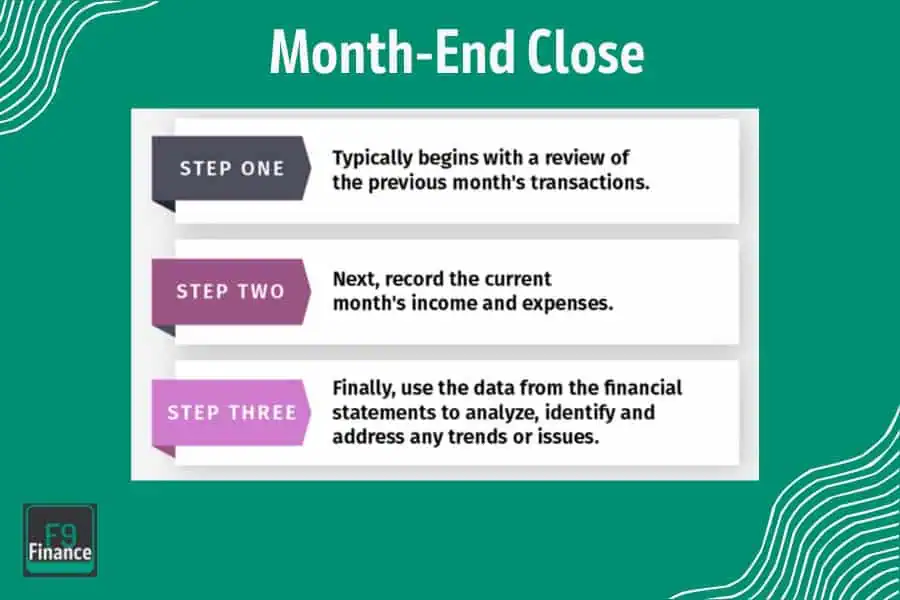
Step 2: Break Down the Month-End Close Process

Before you can automate anything, you’ve got to know what you’re working with. Think of this like cleaning out a cluttered closet. You need to figure out which parts are worth keeping (a.k.a. your high-value tasks) and which ones are just taking up space (hello, mind-numbing, repetitive work).
Breaking down your month-end close process is the first step in automating strategically—because throwing automation at the wrong tasks won’t save you time, it’ll just create chaos.
Map Out Your Workflow
Start by listing every task in your close process, big or small. And I mean everything—from reconciling bank accounts to accruing expenses, from rolling up journal entries to preparing P&L statements. Make sure you document who is responsible for each task, timelines, and any dependencies. Once you’ve got the full picture, it’s time to categorize.
Here’s the simple rule of thumb I use:
High-touch, low-value tasks: These are the menial tasks that eat up hours but don’t require much thinking, like reconciling accounts or matching invoices. Tasks in this category are automation gold.
High-value and repeatable tasks: These are the activities with more significant impact but are repeatable enough to consider automation, like generating standard reports, reconciling fixed assets, or consolidating financials.
High-stakes, judgment-heavy tasks: Keep these manual. Decision-making for things like adjustments or conclusive variance explanations should stay firmly in human hands.
A Real-World Example
Here’s what this looks like in practice. Say reconciling bank statements is part of your monthly grind. It’s time-consuming, repetitive, and doesn’t require much in the way of brainpower—perfect for automation. Now compare that to reviewing and approving adjustments.
Sure, it’s a repeatable task, but it requires judgment, insights, and oversight, which automation can’t replicate (yet). By sorting your tasks this way, you’re setting yourself up to delegate the drudgery to automation while holding onto the tasks where humans add value.
Identify Bottlenecks
Once you’ve mapped everything out, ask yourself this critical question: What’s slowing me down?
Sometimes it’s glaringly obvious—like a painstaking, multistep process for consolidating spreadsheets that leaves you banging your head against the keyboard. Other times, it takes some self-reflection (or maybe a little detective work). Look for these two trouble areas:
Chronically Delayed Tasks: Are some activities always pushing you past your deadlines? This could be a sign the task is too manual or that dependencies are holding you back.
Tasks Prone to Human Error: Think of activities that require copy-pasting or manual data entry. This is where mistakes creep in and take hours to correct.
For me, reconciling accounts used to be a constant bottleneck. Missing transactions, typos, mismatched numbers—it was like an error parade that wouldn’t quit. Identifying it as the problem child in my process made automating it a priority, and trust me, it paid off big time.
Step 3: Automate High-Impact Tasks (Step-by-Step Guide)
Now that you know where your bottlenecks are and which tasks are ripe for automation, it’s time to roll up your sleeves and tackle the big one—account reconciliation.
Out of all the tasks in the month-end close process, this is one of the biggest time-suckers and the easiest to automate. Follow these steps to reclaim hours of your life and eliminate headaches.
Automating Account Reconciliation
Set up Automatic Bank Feeds
Start by linking your bank accounts to your ERP system or reconciliation tool. Most modern ERP systems like NetSuite or Oracle allow you to pull in transactions directly from your bank, creating a live feed of data to work with. No more manually downloading and uploading CSV files (thank goodness). This alone can save you a huge chunk of time every month.
Use Spreadsheet Functions to Flag Mismatches
If you’re not ready to fully jump into ERP automations—or if you’re dealing with a smaller system—spreadsheets can still be your MVP. Tools like Power Query come packed with features designed for tasks like this. Power Query lets you import data from multiple sources, clean it up, and spot mismatches with minimal effort. You can create rules to identify discrepancies automatically, flagging anything that doesn’t align with your ledger.
Configure Rules for Recurring Transactions
Recurring transactions—like vendor payments, subscriptions, or payroll—are prime candidates for automation. Most ERPs or reconciliation tools allow you to predefine rules for these transactions so they’re matched or categorized correctly each month.
For example, you can set up a rule to assign regular payments to the same GL account without lifting a finger. Imagine the time saved when you’re not reconciling identical entries over and over again.
Case Study: A Mid-Size Company’s Big Win
Here’s a real-world example of just how effective automating account reconciliation can be. A mid-size e-commerce company was spending around 15 hours per week on manual reconciliations. The team had grown accustomed to exporting bank transactions, cross-referencing them with the general ledger, and manually resolving mismatches. It was an exhausting, error-prone process that delayed their close every month.
Then they discovered Power Query. By using it as part of their reconciliation workflow, they automated data imports and created rules to highlight discrepancies as soon as they happened. They also configured recurring transactions—like monthly merchant fees and vendor payments—to match automatically.
The result? Reconciliation times dropped from 15 hours to just 5 hours per week. That’s 10 hours saved every week, adding up to over a week of productive time gained per month. Not to mention fewer headaches and a team that wasn’t constantly overwhelmed at month-end.
If that doesn’t convince you, I don’t know what will. Automating account reconciliation may take a little upfront effort, but the payoff is undeniable. Those hours you save? You can reinvest them into higher-value activities. Or, you know, enjoy an extra coffee break. Either way, it’s a win-win.
By focusing on high-impact tasks like this, you’ll feel the difference immediately—and your close process will start to feel less like a grueling marathon and more like an efficient machine. Trust me, your future self will thank you.
Standardizing Journal Entries
Journal entries are the unsung heroes of month-end close. They’re everywhere—recurring items like depreciation, payroll allocations, or accrued expenses. And while they might seem straightforward, manually entering them over and over again is essentially begging for errors. The good news? Standardization can save the day (and your sanity).
Start by creating templates in your ERP system for recurring entries. These templates allow you to set the format, accounts, and calculations ahead of time, so all you have to do is plug in the latest amounts. For unique calculations, macros or automation scripts can step in. With tools like VBA or Python, you can automate even the quirkiest of journal entries—saving time and minimizing mistakes.
Here’s a quick story to illustrate why this matters. A manufacturing company I worked with used to handle payroll allocations manually. Every month, someone had to calculate fringe benefits for multiple departments and then split them into the appropriate accounts. One typo was all it took to cause chaos. Once they standardized the process using an ERP template, errors dropped to near-zero, and they cut hours off their close time. That’s the power of standardization—it doesn’t just make your life easier; it improves accuracy across the board.
Automating Financial Reporting
If building accurate financial reports feels like more of a saga than a task, you’re not alone. Gathering data from multiple sources, tying it up with a bow, and delivering insights on time can be a nightmare. That’s where automation comes in to save the day—and your weekends.
One of the first steps is linking your data sources directly into a reporting tool like Power BI. Instead of manually moving data between Excel sheets and reporting platforms, an automated link keeps everything up to date in real time. Next, you can automate roll-forwards for balance sheet accounts. Templates or ERP scripts can carry over ending balances month to month, reducing manual adjustments.
Here’s an example from a CFO I worked with (a true automation evangelist). His reporting process used to take three full days each month, and getting usable insights for planning was even slower. After automating data feeds and implementing Power BI dashboards, he reduced that time to a few hours. Even better? The leadership team went from waiting to weigh in on old numbers to leveraging real-time reporting for strategic decisions. Fewer manual steps, faster results, smarter planning—it’s a win all around.
Streamlining Approvals and Alerts
Approvals can be a black hole of time during month-end close. You submit something, then wait…and wait…and wait. By the time you get the green light, half the day is gone. Sound familiar? Streamlining approvals isn’t just a convenience; it’s critical for meeting deadlines.
One way to fix this is by setting up automated approval queues in your task management system or ERP. Instead of sending emails into the void, these systems assign tasks to the right person, track their status, and move items forward once approved. It’s an assembly line for your workflow—and a fast one at that.
Alerts are another game-changer. Enable notifications for overdue tasks or flagged errors and watch how quickly bottlenecks disappear. You’ll know exactly where your process is getting stuck and can take action before it blows up your timeline.
I once worked with finance and accounting teams that used automated alerts during their close. They synced their ERP with their task manager so reviewers got pinged when something needed their attention. If it wasn’t approved within a set time, the alert escalated to a manager. It wasn’t just about speed; it created accountability and ensured they never missed deadlines.
When you’ve got standardized entries, automated reports, and streamlined approvals all running like clockwork, month-end close becomes less of a war zone and more of a strategic process. With these steps, you’re not only saving time—you’re building a foundation for smarter, more efficient workflows.
Step 4: Roll Out Automation Across Your Team
Here’s the thing about automation—it’s awesome. But not everyone on your team will share your enthusiasm right out of the gate. When people hear “automation,” some of them picture robots stealing their jobs or drowning in a sea of confusing tech. It’s your job to change the narrative and show them that automation isn’t here to replace them; it’s here to make their lives easier.
Get Your Team on Board
The first obstacle? Addressing the elephant in the room—job security. I’ve been there. The moment I introduced automation to my team, the mood in the room shifted faster than you can say “Power Query.” People were worried that their roles would fade into irrelevance. I had to give them a reality check. Automation is about taking the grunt work off their plates so they can focus on tasks that actually require their skills—think analyzing trends, solving problems, and driving strategy.
Use simple examples to drive the point home. “Remember how reconciling bank statements used to take up an entire day? Now it’s an hour of checking flagged mismatches. That leaves the rest of the day for big-picture work.” Once people see how this helps them, they’ll realize it’s not an enemy—it’s an ally.
Train and Upskill for the Future
Next, help your team grow alongside the tools. Automating processes isn’t a “set it and forget it” deal; your staff needs to know how to run the automations, tweak them as needed, and interpret the results. This means investing time in training.
For starters:
Do hands-on workshops for key tools, like your ERP system or spreadsheet automations.
Create playbooks for new processes so your team has an easy reference.
Upskill team members on how to identify other areas ripe for automation—because trust me, once they get the hang of it, they’ll start finding time-saving opportunities everywhere.
Start Small and Scale Up
Rolling out automation doesn’t mean you need to flip a switch and automate everything overnight. That’s a surefire way to create chaos. Instead, pilot small changes on a manageable scale to build confidence and work out any kinks in your process.
Pick one or two tasks that your team struggles with the most—something like reconciliations or financial reporting—and automate those first. Then, make sure you gather feedback. What worked? What didn’t? Were there any surprises? Use this input to refine your approach and tweak the process before scaling to other areas.
For me, reconciling accounts was the obvious starting point. Once my team saw how smooth and painless it was to automate that task, they were much more open to automating reporting, journal entries, and even approvals. Each win built trust in the process and made the entire team more comfortable with the shift.
Build Momentum
Every time you refine a process, celebrate the win. Share stats—like how reconciliations are now 80% faster or how errors have dropped drastically—and give credit to the team for making it happen. This reinforces that automation is a tool for their success, not something being forced on them.
Before you know it, you’ll have a team that doesn’t just accept automation—they’ll champion it. And when that happens? Take a moment to enjoy the payoff. By scaling automation strategically, you’ll not only streamline the month-end close but also empower your team to work smarter, not harder.
The Potential Snags (and How to Navigate Them)
Alright, before we get too carried away with the magic of automation, let’s talk about the bumps in the road—because trust me, they’re inevitable. The good news? With a little forethought and the right fixes, you can smooth them out.
Integration Issues
Not all tools are besties right out of the box. Imagine setting up your shiny new Power BI dashboards only to realize your ERP isn’t exactly interested in engaging. Frustrating? Absolutely. But it’s not a dead end.
Here’s the fix: middleware. Think tools like Zapier, Improvado, or custom APIs. They act as a bridge, helping systems “talk” to each other. I once worked on a project where the ERP threw a tantrum every time we sent data to Tableau. Enter a simple middleware solution, and voilà—data flowed like a dream. The key is doing your homework upfront. Identify which tools integrate easily and which might need some extra support.
Resistance from Team Members
We’ve covered this before, but I’ll say it again—people resist change. Whether it’s fear of the unknown, a nostalgic attachment to their old processes, or just plain stubbornness, team pushback is one of the biggest automation hurdles.
A few tips for a drama-free transition:
Roll out changes in phases—small wins build trust.
Share success stories—highlight how automation has saved time and reduced headaches in specific tasks.
Be approachable—your team needs to feel heard. If they run into issues, make sure there’s a clear process for feedback and troubleshooting.
No rollout is perfect, but if you anticipate these snags and handle them proactively, you’ll set yourself up for smoother sailing—and, ultimately, a more efficient process.