
9 AI In Finance Trends To Watch (2026)

A few months ago, I had one of those “oh… we’re really doing this now?” moments.
I was prepping for a meeting, coffee in hand, ready to wrestle with a messy variance file that normally eats half my morning. I opened the workbook…and the variance was already done. Not because someone came in early. Not because I forgot I’d done it yesterday. Nope.
An AI agent I built—a scrappy little thing that used to break every 12 minutes—had quietly pulled new ERP exports, cleaned them, matched them to prior periods, wrote the explanations, and dropped a neat little summary in my inbox like it was leaving a croissant on my doorstep.
Gartner’s 2025–2026 AI outlook predicted that by 2026, 80% of enterprises will deploy agentic AI inside core business processes, up from less than 5% in 2023. Meanwhile, Boston Consulting Group’s 2025 report found that companies who operationalize AI—meaning real workflows, real ROI—are already seeing productivity lifts of 30–50% across finance and operations, with top performers hitting even higher.
Translation: the gap between teams who adopt AI and teams who don’t isn’t a gap anymore—it’s a canyon
And if you’re in finance, that canyon is staring right back at you every time month-end hits.
In this guide, I’m going to walk through the biggest AI trends shaping 2026—what’s real, what’s hype, and what you should actually do about it. I’ll break it down with step-by-step examples, real finance team case studies, and the practical “okay, how do I not get steamrolled by this?” advice that Gartner and BCG conveniently leave out.
AI In Finance Trends #1: LLMs stopped being passive.
They don’t just describe or suggest anymore—they act.

Thanks to OpenAI AgentKit, Microsoft Agent Mode, Gemini’s orchestrators, and half the startup world, AI can now:
- Pull data
- Clean, normalize, and map it
- Apply business rules
- Write new files
- Push updates into dashboards
- Trigger downstream workflows
- Ask for clarification when something looks off
These capabilities are made possible by advanced algorithms and AI-powered systems, which have significantly expanded AI capabilities in finance workflows by enabling real-time data analysis, automation, and dynamic scenario planning.
Basically, they went from interns to analysts—minus the PTO requests.
Trend #2: AI got tool access inside enterprise systems.
This was the real unlock.
Once AI could literally use Excel, Power BI, SQL, SAP exports, APIs, and email… it stopped being a toy and started being part of the engine room.
Example: Excel Agent Mode now lets an agent run an entire workbook—formulas, pivots, Power Query steps, Python cells, charts—like a miniature, caffeinated FP&A analyst who doesn’t complain about “visibility into upstream data.”
OpenAI AgentKit lets you hand an AI model your actual workflow steps, and it executes them like a script… but smarter.
Organizations are now working to implement AI and AI-powered automation across finance operations, even when faced with legacy systems. Integrating modern AI solutions with outdated technology presents challenges such as compatibility issues and data silos, but successful adoption can significantly improve operational efficiency and provide a competitive advantage.
This is why company adoption is spiking. Gartner expects that by 2026, enterprise AI agents will automate at least 30% of routine financial processes, including reporting, reconciliations, and forecasting cycles.
Step-by-Step: What Agentic AI Actually Does in a Workflow
People hear “agent” and think “robot person with magical powers.” Nope. It’s way more practical than that—and that’s the beauty.
These agentic workflows represent some of the most advanced AI applications and AI tools in finance, capable of handling increasingly complex tasks that were previously reserved for human analysts.
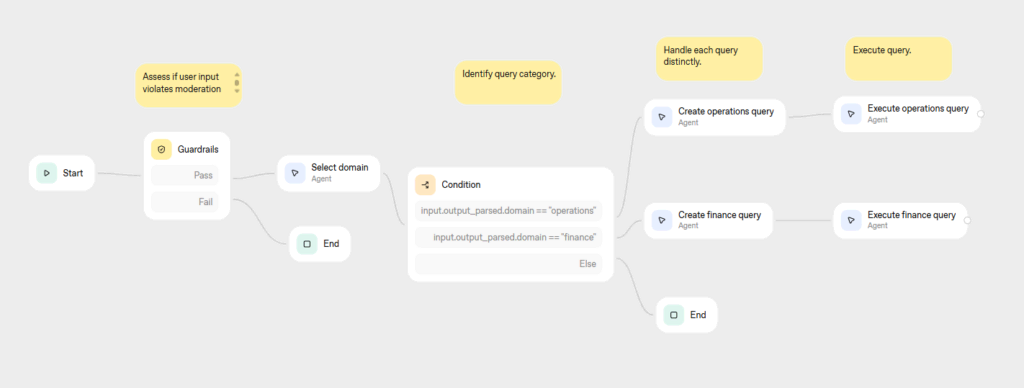
Here’s what an AI agent really does when you put it inside a finance workflow:
Step 1: Ingest the data
Agents pull from:
- ERPs
- Data warehouses
- Excel files
- PDFs
- APIs
- Email attachments
- Transactional data
- Market data
- Historical financial records
And they do it on schedule, without you hunting through your downloads folder like a raccoon digging for snacks.
Step 2: Interpret your logic
This is where the leap happened. Agents can follow layered FP&A rules like:
- “Allocate revenue by region unless below threshold X.”
- “Flag variances >10% year-over-year unless pre-approved.”
- “Apply run-rate logic for headcount but override for seasonality.”
This step is crucial for ensuring transparency and accountability in decision making processes within finance workflows, as it allows AI systems to clarify how and why specific actions are taken.
You know—the annoying stuff that’s technically simple but impossible to trust anyone else with.
Step 3: Call tools
This is the part that feels like sci-fi.
Agents can now:
- Clean your data via Power Query
- Write formulas or DAX
- Execute Python steps
- Regenerate pivot tables and charts
- Refresh Power BI datasets
- Trigger emails or Teams notifications
All these actions are enabled by AI-powered tools designed to automate and streamline financial operations, enhancing accuracy and efficiency across workflows.
They’re not “thinking about your spreadsheet.” They’re using it.
Step 4: Generate deliverables
Outputs include:
- Completed Excel workbooks
- Variance explanations
- KPI decks
- Forecast updates
- Financial forecasts generated by AI-driven predictive analytics
- Flux commentary
- Email summaries
And unlike most humans, the formatting is actually decent.
Step 5: Ask for exceptions
This is the moment when you realize a workflow isn’t dumb anymore.
Agents send prompts like:
“Headcount variance for Sales is 22% over plan, driven by 4 new hires. One job code seems misclassified. Should I adjust or hold?”
It’s like an analyst who double-checks their work without being asked.
Step 6: Re-run itself autonomously
This is the game-changer.
Agents aren’t “one and done.” They can loop:
- Daily
- Hourly
- On-demand
- Triggered by a data change
And they don’t get sloppy at 4 p.m. on a Friday.
Mini Case Study: “The Month-End Close That Closed Itself”
A mid-market controller I worked with recently told me, “I think my close is…the word is shrinking? Is that allowed?”
Here’s what happened.
Before AI:
- 3 analysts manually pulled ERP data.
- 40+ Power Query steps per file.
- Variance explanations took days.
- Leadership commentary was always late.
- Close = 5 days of chaos + one sacrificial weekend.
After deploying an AI agent:
- The agent pulls every core data source at 6 a.m.
- Cleans, standardizes, and maps everything.
- Runs every Power Query transform.
- Rebuilds every workbook.
- Generates first-draft commentary.
- Flags exceptions for human review.
Total human touch time? About 2.5 hours. Close time? Down from 5 days to 1.5.
BCG’s 2025 report found that companies deploying autonomous financial workflows achieved up to 70% cycle-time reduction in planning, reporting, and close. But seeing it happen in real life? Wild.
The controller’s biggest problem now? Leadership suddenly expects tight commentary before lunch.
Trend #3 — AI Goes On-Prem, Behind the Firewall, Everywhere
For the last two years, every finance leader conference had the same obligatory breakout session:
“We’d love to use AI… but security, you know?”
And then everybody nodded politely, as if “security” was code for “my IT team still thinks AI is a fad and refuses to let me upload anything.”
But 2026 flipped the script. AI didn’t move into the enterprise — the enterprise moved around AI.
Protecting sensitive financial data and ensuring data privacy are now primary concerns for banks and financial institutions implementing AI systems. Data privacy and security have become central to AI adoption, especially as organizations must comply with regulations and safeguard confidential information.
Gartner’s 2026 AI Infrastructure Forecast shows that over 60% of large organizations have already deployed private or on-prem LLMs to support sensitive finance, legal, and operations workflows — up from under 10% just two years earlier. And Boston Consulting Group found that companies adopting private AI deployments are 2.5× more likely to automate regulated workflows like reconciliations, compliance reporting, and tax analysis.
In other words: security didn’t kill AI. Security just demanded a version of AI that wears a badge and follows the dress code.
Let’s unpack how this changes the world for finance teams.
The Privacy & Security Reversal
I used to joke that the biggest blocker to AI adoption was a PDF titled “AI Risk Assessment – Draft (Final)” sitting in someone’s SharePoint folder.
But here’s what happened: vendors responded with features like private LLMs, tenant isolation, audit logs, and enterprise-grade security. These measures are essential for meeting regulatory compliance requirements in the finance industry, ensuring that AI implementations adhere to evolving legal and ethical standards.
Vendors realized enterprise dollars require enterprise trust.
Microsoft, Google, SAP, Workday, Snowflake, Oracle, Coupa, Salesforce — you name it — all raced to release:
- Private LLMs running in your VPC
- Tenant-isolated models for Microsoft 365 and Google Workspace
- Event-level auditing for every AI action
- Zero-data retention policies baked into defaults
- SOC 2–aligned controls around prompts and outputs
Suddenly, AI wasn’t a mysterious black box in the cloud.
It was just another secure service sitting next to your data warehouse.
Result:
The compliance team — formerly the Department of No — turned into the Department of “…okay, this actually solves half our problems.”
What This Changes for Finance Teams
When AI finally got the corporate security badge, something magical happened: finance teams could finally unlock the full potential of automation, analytics, and forecasting without compromising sensitive data. As finance AI solutions become more prevalent, finance professionals are increasingly required to develop AI expertise to leverage these technologies and maximize the benefits of secure AI integration. This shift empowers finance professionals to automate repetitive tasks, enhance reporting accuracy, and make more strategic decisions, all while maintaining compliance and data integrity.
AI became part of every keystroke.
You know those little “Copilot is thinking…” messages in Excel, Power BI, Outlook, and Teams?
Those aren’t gimmicks anymore — that’s your on-prem model doing:
- Inline formula explanations
- Real-time data quality checks
- Reconciliation suggestions
- Variance detection
- Commentary drafts
- Forecast model validation
- Automated email summaries
- Cross-system data mapping
You’re not “using AI.”
You’re working inside AI-enabled systems.
Case Study: The Risk Management Team That Finally Said Yes to AI
Let me tell you about one of my favorite transformations this year.
A finance team at a global SaaS company had been begging to automate their variance commentary and flux analysis. But Risk & Compliance kept shutting it down:
- Too sensitive
- Too much PII
- Too much audit exposure
- Too risky
The adoption of AI in this case study significantly improved risk management by enabling secure automation of sensitive financial workflows, allowing the team to leverage AI-driven risk assessment and mitigation strategies without compromising compliance or data security.
Fast forward to early 2026.
Microsoft rolled out a fully on-prem Copilot deployment option. Their IT team spun up a private model inside their Azure tenant. Their compliance lead reviewed the full audit trail and said the corporate equivalent of:
“Oh. This doesn’t violate anything. Carry on.”
So they piloted AI in one workflow: monthly revenue variance explanations.
Before AI:
- Analysts spend 12–16 hours per close writing commentary
- Leaders complain commentary is inconsistent
- Audit always asks for supporting calculation detail
- Every revision cycle involves rewriting the same bullets 4 times
After AI (on-prem):
- AI auto-pulls the data
- Runs prior-period comparisons
- Applies logic from historical commentary
- Drafts explanations in management’s tone
- Links supporting detail automatically
- Sends exceptions to humans for review
- Logs every step for audit
Human touch time dropped from 16 hours → 2 hours.
Audit findings? Dropped to zero.
Leadership satisfaction? Through the roof — because commentary arrived day one, not day four.
Gartner calls this the “invisible automation layer” — AI that runs quietly under the finance stack, cleaning up everything your systems should’ve been doing all along.
This is the impact of secure AI.
It doesn’t just make things faster — it makes things safe enough to automate the work we thought would be manual forever.
Trend #4 — The Rise of AI-Native Spreadsheets & BI Tools
I used to joke that Excel was immortal — like some kind of ancient deity powered by VLOOKUP sacrifices and the tears of first-year analysts. But in 2026, Excel (and Sheets, and Power BI) didn’t just get smarter. They became AI-native workspaces — tools that don’t wait for you to click buttons. They do the work themselves.
AI-native spreadsheets and BI tools are now transforming data analytics, predictive analytics, and portfolio management in finance—enabling complex analysis, smarter forecasting, and automated investment strategies directly within your daily workflows.
Gartner predicted this two years ago when they said that by 2026, 70% of enterprise users would rely on AI-driven spreadsheet and BI automation for routine financial modeling, cleansing, and reporting. And Boston Consulting Group’s research found that teams using AI-native BI workflows achieved 40–60% faster planning cycles and made decisions with significantly higher accuracy because the data was clean before analysts even touched it.
That’s not hype. That’s not “sometime in the future.” That’s your workbook… right now… asking if you want it to draft the forecast for you.
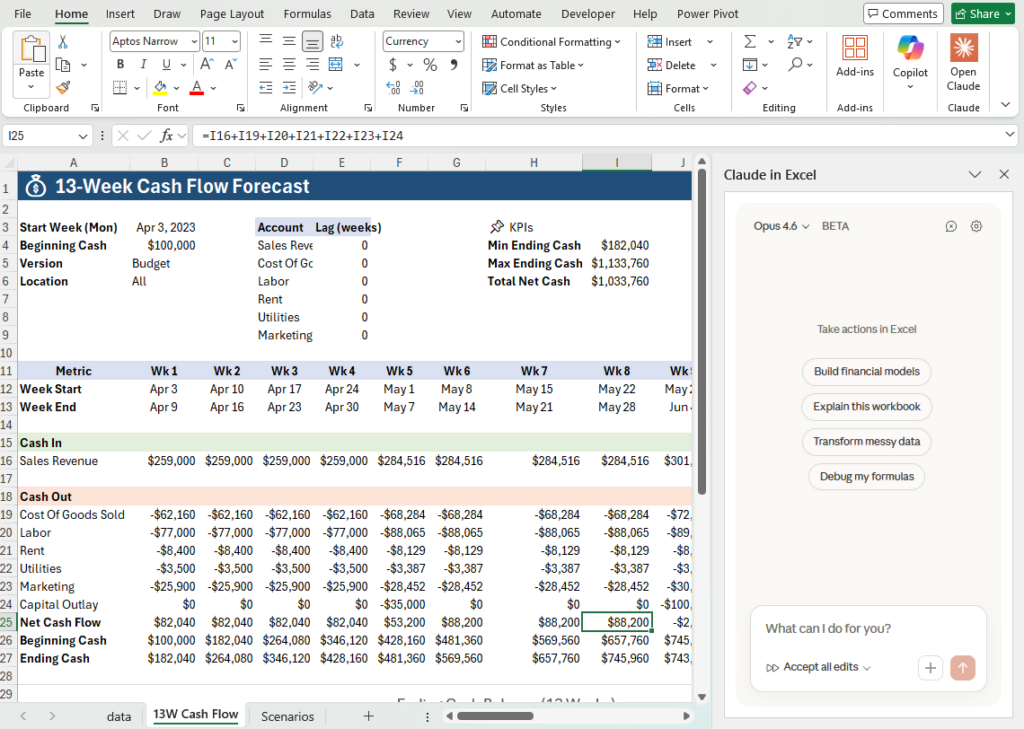
Excel, Sheets, and Power BI Become Autonomous Workspaces
If Section 1 was about agents becoming coworkers, this section is about spreadsheets becoming self-updating financial models — the kind of thing consultants would’ve charged your CFO a kidney to build in 2017.
Recent advances in AI technologies have enabled the development of autonomous financial modeling and reporting workspaces, allowing finance teams to automate updates, streamline processes, and improve accuracy with minimal manual intervention.
Here’s what changed.
AI builds the model for you.
In Excel and Sheets, you can now literally say:
“Build me a dynamic revenue model with seasonality adjustments and FX impacts. Use historical data where available.”
AI-driven financial analysis is now accessible directly within spreadsheets, allowing users to automate and enhance the process of building and analyzing financial models with just a prompt.
…and the model appears. Measures. Logic. Charts. Documentation. Completed.
AI refactors your spaghetti logic into readable formulas and DAX.
Ever inherited a workbook that looked like it was written by someone holding down the keyboard during an earthquake?
Now you hit “Explain,” and AI rewrites the formulas so a human can understand them.
AI creates star schemas automatically.
Power BI was already powerful — the problem was most analysts didn’t want to admit they didn’t fully understand data modeling.
Now you can say:
“Create a star schema from these tables and show me the DAX for the calculated measures.”
Power BI builds it.
With consistent naming.
And relationships that actually make sense.
Python + AI turns BI into a mini machine-learning lab.
Not “data scientist” level. Just enough ML to forecast, cluster, classify, or segment without begging a data team.
2026 finance teams aren’t waiting around for someone else to run the model. They’re running it themselves, in the tools they already live in. Today, machine learning models are increasingly integrated into BI tools, enabling finance teams to leverage advanced analytics like forecasting and clustering directly within their workflows.
Step-by-Step Walkthrough: “I Built This Forecast by Talking to Excel.”
Let me show you what an AI-native spreadsheet actually does now.
This is an actual workflow from a client’s ops team — a real story, not a theoretical fever dream.
First, we start with Excel’s data cleaning and transformation tools to prep the raw data. With AI, you can now analyze vast amounts of financial data in seconds, dramatically accelerating the workflow and enabling faster, more accurate insights.
Step 1 — I loaded the data.
I dragged in three CSVs from an ERP export.
Excel recognized:
- Revenue
- Customers
- Product families
- Regions
- Dates
It asked if I wanted it to clean the data.
(Obviously yes. My ERP outputs are chaos.)
Step 2 — Excel fixed the entire data model.
It:
- Standardized date formats
- Filled missing customer IDs based on historical matches
- Flagged duplicated transactions
- Inferred product categories
- Suggested transformations I didn’t even know I needed
It basically did three hours of Power Query in 12 seconds.
Step 3 — I literally said, “Build a rolling 12-month forecast.”
And the agent in Excel:
- Recognized seasonal patterns
- Searched for anomalies
- Performed cash flow forecasting
- Ran a hybrid statistical + ML model
- Drafted a what-if scenario
- Added a dashboard with KPIs
- Suggested commentary to explain the drivers
I didn’t write a single formula. I didn’t create a single pivot. I didn’t manually check the data.
Step 4 — Excel explained the whole thing.
Every assumption.
Every calculation.
Every outlier decision.
Every fallback rule.
BCG’s 2025 study on AI transparency said organizations that use explainable AI inside BI tools have significantly higher executive trust in forecasts. And I get why — because when Excel tells you why it chose a model, you stop guessing whether it hallucinated.
Step 5 — I asked Excel to update it “every morning at 6.”
It scheduled itself.
It refreshes itself.
It emails me any variances over 5%.
It even updates the Power BI dashboard without human intervention.
This isn’t “Excel but with a chatbot.”
This is Excel as a forecasting system.
Case Study: The Analyst Who Became a One-Person Data Team
One of my favorite stories this year comes from a senior analyst at a $2B business unit who basically turned into a data army of one thanks to AI-native BI tools.
These AI-native BI tools empower finance teams to deliver faster, deeper insights and operate at a higher strategic level, moving beyond basic reporting to proactive collaboration and decision-making.
Here’s the before and after.
Before AI-native BI:
- Needed the data engineering team for every SQL view
- Manually reconciled exports weekly
- Rebuilt dashboards every month-end
- Delivered forecasts 48 hours later than leadership wanted
- Always felt “behind” the business
After AI-native BI:
- Power BI auto-built semantic models
- Excel cleaned data automatically
- Python-in-BI handled statistical forecasting
- AI agents rebuilt dashboards overnight
- Commentary generated itself
- Leader questions could be answered in seconds, not hours
The kicker?
The CFO thought they hired three new analysts because the volume and speed of insights exploded.
Nope.
Just one analyst… with an AI-native tool stack.
Gartner calls this the “super-analyst effect.” I call it the reason so many finance teams are rewriting job descriptions this year.
Trend #5 — Synthetic Data Becomes a Finance Superpower
If 2025 was the year everyone finally admitted their data was a mess, 2026 is the year we stopped waiting for perfect data and just… generated the data we needed.
Yes, really.
Synthetic data went from a niche “data science thing” to a full-blown finance power tool practically overnight. Gartner projected that by 2026, 85% of AI models used by enterprises will be trained or tested on synthetic data because it’s safer, cheaper, and infinitely faster than wrangling real-world messiness. Boston Consulting Group’s latest research echoed the trend, noting that teams using synthetic data saw forecast accuracy improve 20–30% because they could stress-test thousands of alternate outcomes instead of a handful of stale scenarios.
Synthetic data is also becoming an integral part of the evolving financial ecosystem, supporting innovation and risk management as AI-driven solutions reshape how banking, cybersecurity, and regulatory compliance interact.
But forget the research for a minute — let me tell you why finance teams actually love synthetic data.
It solves three chronic problems we’ve had for years:
- We don’t have enough clean historical data
- The data we do have is noisy as hell
- Every time we ask for more data, IT says, “We’ll get to it next quarter”
So we stopped waiting and started generating.
Let’s break it down.
Why Everybody Suddenly Cares About Synthetic Data
Here’s the part where I confess something: the first time someone told me, “We’ll train it on synthetic financial data,” I squinted like they’d suggested using Monopoly money in a 10-K.
But synthetic data isn’t fake. It’s mathematically sound, statistically accurate, and privacy-safe. While synthetic data addresses some privacy issues, AI raises concerns about data security and compliance with regulations like GDPR that must still be managed.
Finance gravitated to it fast because:
It bypasses PII nightmares.
No customer names.
No IDs.
No sensitive transaction detail.
SOX, audit, privacy, compliance? All suddenly much happier.
It lets us simulate what has never happened.
Want to test a recession that looks nothing like 2008?
A demand shock that’s weirder than 2020?
A hiring freeze that hits only one region?
Synthetic data says, “Cool, here are 10,000 versions of that.”
It fills in the gaps where your ERP has hurt you.
Missing dates, inconsistent product mappings, broken codes, half-complete cost centers — you name it.
Synthetic data rebuilds statistical patterns as if the mess never existed.
It lets FP&A experiment safely.
BCG found that organizations using synthetic data for scenario modeling iterate 5–10× faster because there’s no risk of “touching real financials.”
That last point is huge.
For the first time in our lives, FP&A can break things on purpose without anyone yelling.
Step-by-Step: How Synthetic Data Gets Used in FP&A
Let me walk you through a real workflow so this doesn’t feel abstract.
Here’s how FP&A teams are using synthetic data in 2026 to run scenario planning and strengthen forecasts.
Step 1 — Build a probabilistic model of your historical data.
The AI learns the patterns in your real dataset:
- Revenue seasonality
- Customer churn distribution
- Unit economics behavior
- Hiring cadence
- Expense volatility
- FX impacts
- Lead-to-close rate patterns
You’re basically teaching the system how your business breathes.
Step 2 — Generate thousands of “alternate futures.”
This part feels like cheating.
The AI produces synthetic datasets such as:
- 10,000 revenue paths for the next 24 months
- 5,000 headcount curves
- 3,000 churn distributions
- 20,000 expense profiles
And all of them are:
- Statistically valid
- Borderline terrifying in their creativity
- Impossible to produce manually
Step 3 — Stress-test your assumptions.
You can now run analyses like:
- “What if marketing efficiency drops 20%?”
- “What if churn spikes only in Q3?”
- “What if FX swings ±8% every other month?”
- “What if we freeze hiring after January?”
Every scenario has data, patterns, and variance ranges behind it — not vibes.
Step 4 — Feed outputs into your planning cycle.
Here’s where FP&A gets supercharged:
- ML-driven forecasts improve
- Sensitivity analysis becomes robust
- Risk-adjusted scenarios become standard
- Executive updates rely on empirical probabilities
This isn’t “here’s the base case and the two we slapped together.”
This is “here’s confidence-weighted guidance pulled from thousands of potential realities.”
Gartner calls this “future-proof forecasting.”
I call it “finally having a fighting chance when the CFO asks, ‘How confident are we?’”
Case Study: Treasury Uses Synthetic Data to Predict Liquidity Crises
Let me give you a real example that floored me.
A treasury team at a multinational consumer goods company was constantly battling liquidity volatility. Cash positions looked fine one month, terrifying the next. Their historical data was too small and too chaotic to build reliable models.
So in 2026 they turned to synthetic data.
By leveraging synthetic data and AI-driven scenario modeling, the team was able to mitigate risks associated with liquidity volatility, improving their ability to anticipate and manage cash flow challenges.
Here’s what happened.
Before Synthetic Data:
- Treasury could only model 3–5 scenarios
- Cash buffers were oversized “just in case”
- Forecast accuracy hovered around 60%
- Leadership hated surprises
- Stress tests were more art than science
After Synthetic Data:
They generated:
- 20,000 simulated cash-flow paths
- Dozens of tail-risk shock events
- Synthetic versions of extreme demand spikes
- Synthetic supplier payment delays
- Synthetic FX volatility curves
Then the AI identified:
- Early-warning indicators
- Likely liquidity timing issues
- Vulnerable cash positions
- Confidence intervals
Forecast accuracy jumped to 88%.
Cash buffer requirements dropped by 15% without increasing risk.
Treasury suddenly looked like they had a crystal ball.
Boston Consulting Group’s research noted this exact trend: companies using synthetic data for planning and treasury functions saw material improvements in capital allocation and risk positioning — because they’re no longer flying blind.
Trend #6 — AI Assistants Get Job Titles (and KPIs)
A funny thing happened around mid-2025: companies stopped talking about “using AI” and started talking about “hiring AI.”
And I’m not being metaphorical.
I’ve now seen job descriptions for things like AI Close Assistant, AI Financial Analyst, and my personal favorite:
“AI Reporting Specialist responsible for preparing draft month-end packages with 95% accuracy.”
Organizations are now deploying ai solutions and ai processes with clear business objectives, ensuring that AI assistants in finance are strategically aligned to maximize efficiency, compliance, and customer experience.
Somewhere out there, a chatbot is getting better performance reviews than half the analyst pool.
Gartner nailed this trend early when they projected that by 2026, 30% of enterprise finance tasks will be handled by autonomous or semi-autonomous AI systems. Boston Consulting Group’s 2025 analysis went further, showing that companies who assign explicit roles and KPIs to AI see 2–3× higher ROI than those treating AI like an optional assistive tool.
Why? Because once AI takes on real work, you need to manage it like a real team member.
Let’s walk through what’s changing inside finance teams right now.
The New Roles AI Is Taking Over
AI isn’t just assisting anymore — it’s owning repeatable workflows. And companies are finally naming these responsibilities because that’s how you scale accountability.
Here are the roles I see everywhere in 2026:
- AI-powered financial analyst
- Automated reporting specialist
- AI-driven compliance monitor
- Virtual finance assistant (now often responsible for customer interaction, providing personalized financial advice and support)
- AI-based forecasting manager
🧠 AI Financial Analyst
Handles:
- First-draft variance commentary
- KPI tracking
- Forecast refreshes
- Rolling dashboards
- Driver updates
Basically the grunt work we all hated.
AI Close Assistant
Runs:
- Journal entry suggestions
- GL reconciliations
- Accrual logic
- Exception flagging
- Close checklists
Gartner highlighted that automated close assistants reduce cycle time by up to 40% — and it shows.
AI Reporting Specialist
Produces:
- Draft decks
- Slides
- Pivots
- Charts
- Data pulls
- Monthly packages
If you’ve ever built a 68-slide deck for a VP who reads only three slides, this role hits home.
AI Tax Researcher
Summarizes tax memos, flags regulatory changes, and drafts documentation.
CPAs everywhere rejoiced.
AI Audit Prep Assistant
Compiles audit samples, creates evidence packs, logs system changes, and explains variances.
I’m convinced this one alone will knock weeks off audit cycles.
These aren’t hypothetical use cases — they’re job descriptions teams are quietly rolling out right now. And because the work is recurring and rules-based, AI handles it frighteningly well.
How Companies Are Measuring AI ROI in 2026
When I talk to CFOs about AI, they don’t ask, “What model did you use?” They ask:
“How do I know this thing is actually worth it?”
So companies started measuring AI like any other employee.
Here are the KPIs popping up everywhere:
⏱ Hours Reclaimed
The simplest metric — and still the most powerful. BCG found that top-performing companies reclaim up to 50% of analyst hours with AI automation.
📉 Error Rate Reduction
AI doesn’t get tired. Humans do. Teams report error reductions of 20–60% on repetitive tasks. Advanced AI algorithms play a key role here, driving down error rates by automating complex data analysis and decision-making with greater consistency and reliability.
📈 Forecast Accuracy
When agents consistently update assumptions, accuracy naturally climbs. Gartner estimates automated forecasting improves accuracy by 15–25%. AI algorithms enhance this further by recognizing patterns and refining predictions over time.
⚡ Cycle Time Compression
Month-end goes from 5 days → 2. Forecast cadence drops from 10 days → 3. Reporting cycles shrink by half.
🔍 Exception Identification Quality
Executives increasingly measure AI by what it catches rather than what it produces.
📝 Documentation Quality
AI writes better audit trails than most humans. (A painful truth.)
When AI gets KPIs, leaders finally understand what “good” looks like — and the machines start outperforming expectations.
Step-by-Step Framework: “How to Hire Your First AI Coworker”
Most teams screw this up because they think hiring an AI assistant is like installing a browser extension.
Nope. You hire AI the same way you onboard a junior analyst — except the junior analyst doesn’t require a GPU. Successful AI implementation in finance requires a structured approach, just like onboarding a new team member, to address challenges such as costs, regulatory compliance, and ethical practices.
Here’s the playbook I give clients:
Step 1 — Identify a repetitive, rule-based workflow
Great candidates include:
- Variance explanations
- Forecast refreshes
- Reconciliations
- Data cleanup
- KPI reporting
- Close checklists
If you can explain it once in plain English, it’s ripe for automation.
Step 2 — Map the steps and the decision tree
Write out:
- Inputs
- Business rules
- Edge cases
- Conditional logic
- Expected outputs
This becomes the “job description” for your AI coworker.
Step 3 — Build the agent logic
Using:
- OpenAI AgentKit
- Excel Agent Mode
- Power Automate
- Python + AI pipelines
- BI agents
Start with:
“Perform this task end-to-end, then ask for confirmation when something looks unusual.”
Agents excel when humans define what “normal” looks like.
Step 4 — Run in parallel with a human
For 2–4 cycles, compare:
- Accuracy
- Edge-case handling
- Formatting
- Output consistency
- Timing
This is your UAT.
Step 5 — Deploy with controls
Add:
- Audit logs
- Versioning
- Prompt history
- Exception flags
- Approval gates
Compliance suddenly loves you.
Step 6 — Treat it like a real employee
Review performance monthly:
- What is it doing well?
- What broke?
- What needs new rules?
- Where is human judgment still required?
The best teams iterate their AI roles quarterly, just like they would with real humans.
Step 7 — Scale to adjacent workflows
Once one agent works, build siblings.
Your team becomes a hybrid machine-human org — ridiculously fast, brutally efficient, and surprisingly fun to manage.
Trend #7 — Regulation Finally Catches Up to AI
If 2024–2025 was the wild west of AI—gunslingers, snake-oil salesmen, and every vendor promising they’d “revolutionize your workflow” with a Chrome extension—then 2026 is the year the sheriff finally rode into town.
And honestly? It’s about time.
Finance teams have been building AI workflows at breakneck speed. Meanwhile, risk, audit, and compliance teams were standing there like anxious parents watching their kid run with scissors. Eventually, someone was going to get hurt.
Gartner warned us this was coming. Their 2026 Risk & Compliance Outlook predicted that AI governance would become a top-three priority for CFOs as AI-driven decisions start influencing financial statements, audit evidence, SOX processes, and external reporting. Boston Consulting Group’s research echoed it: the companies actually achieving AI ROI are the ones that invested early in controls, documentation, and auditability—not just automation.
Well, the future has arrived. Regulators finally realized AI isn’t a cute sidekick. It’s making real decisions in real workflows that affect real money. New regulations are now focusing on critical areas such as credit risk, credit risk assessment, and credit scoring, with a strong emphasis on the need for transparency in AI’s decision making processes.
Here’s what that means for us.
How 2026 Rules Change the Game
AI regulation in 2026 isn’t about banning use—it’s about documenting, controlling, and explaining use. Think of it as SOX for algorithms.
Financial institutions are rapidly adapting to new regulatory requirements for AI-driven processes, ensuring compliance while leveraging AI for improved efficiency and innovation.
The big regulatory themes hitting finance teams this year include:
1. Required Auditability
Regulators want to see:
- The prompt or instruction set used
- The model version that generated the output
- The source data
- The intermediate reasoning (where applicable)
- Any human overrides
AI can’t be a black box anymore.
If the output influences financial reporting, the model’s reasoning becomes part of the evidence.
2. Model Explainability
This is huge.
If AI generates a forecast adjustment or flags a variance, auditors will ask:
“Why did the model make this decision?”
And yes—models now need to explain themselves in English.
Not statistics. Not formulas.
Plain-language explainability.
Gartner estimates that by 2026, 90% of AI outputs used in financial processes will require some form of model explanation metadata.
3. Use-Case Registries
Companies must track:
- Which processes use AI
- Which teams own each model
- What data sources are involved
- What controls are in place
- How accuracy is measured
It’s like an IT CMDB (configuration database)… but for AI workflows.
4. Data Lineage Documentation
You can no longer shrug and say, “Yeah, I think this dataset comes from the warehouse… somewhere near table 245?”
Nope. Auditors want:
- Clear data sources
- Transformation steps
- Mapping logic
- Synthetic vs real data distinctions
- Version histories
And if the AI does transformations?
Those steps must be logged automatically.
5. Mandatory Governance Reviews
Before an AI touches anything close to a financial statement, companies must run governance checks.
Some firms now require:
- Annual AI model certification
- Quarterly bias testing
- Accuracy benchmarks
- Human-in-the-loop verification for high-impact tasks
It’s not just “Can we automate this?”
It’s “Should we automate this? And do we have the controls to support it?”
What This Means for Finance Teams
At first, these rules sound like more paperwork. More bureaucracy. More hoops to jump through.
But here’s the twist:
AI is making governance easier than it’s ever been.
Let me explain.
AI Workpapers Become Standard
Every time an agent performs a task, it logs:
- Inputs
- Steps
- Decisions
- Flags
- Outputs
It builds a workpaper packet automatically.
This used to take hours. Now it takes zero.
“Explain your logic” becomes a feature, not a nightmare
Power BI, Excel, Agent Mode, and private LLMs all now include explainability features.
Ask:
“Explain how you derived this variance.”
And you get a clear, human-readable explanation citing:
- Drivers
- Comparisons
- Threshold rules
- Edge-case handling
Auditors love this.
It’s like getting a peek inside the analyst’s brain—except the analyst is a machine that documents everything perfectly.
FP&A adopts internal AI controls (like an internal SOX for automation)
Teams are starting to define:
- Approved AI workflows
- Review and approval gates
- Trigger thresholds
- Exception escalation paths
- Data access permissions
- Required logging standards
This is what mature AI operations look like.
AI raises the bar for human work
If the AI is documenting everything, cleaning everything, and explaining everything…
human output suddenly has to be that clean too.
No more:
- “We’ll fix that next cycle.”
- “I don’t remember how I built that model.”
- “Let me try to retrace my steps.”
Those days are over.
The machine sets the standard—clarity, transparency, consistency—and humans follow.
Step-by-Step: Building an Audit-Friendly AI Workflow
Here’s the playbook I give every team implementing AI in a financial process.
If you use this structure, your auditors will hug you. (Well, metaphorically. Probably.)
Step 1 — Capture Instructions
Save:
- Prompts
- Business rules
- Model configurations
- Role definitions
This is the “procedure manual” for your AI coworker.
Step 2 — Store Prompts + Context
Every call gets logged.
Not for fun — for accountability.
Step 3 — Save Outputs Automatically
Agents should write outputs to controlled storage:
- SharePoint
- OneDrive
- Azure blob
- S3
- Snowflake Stage
And include timestamps + metadata.
Step 4 — Version Data Sources
If the AI is using:
- CSVs
- ERP extracts
- SQL tables
- Synthetic datasets
- Python transformations
You need version tags.
If the numbers change, you need a trail explaining why.
Step 5 — Create Variance + Exception Logs
Every time the AI says “this looks weird,” log it.
Auditors LOVE exception logs.
Step 6 — Package an Evidence File
Generate:
- Steps taken
- Inputs
- Outputs
- Decisions
- Exceptions
- Explanations
- Human overrides
This becomes your audit deliverable.
AI builds this automatically.
You just hand it over and watch your auditor’s heart grow three sizes.
Trend # 8 — The New AI Tool Stack: Simpler, Smaller, More Powerful
If you’ve been in finance long enough, you’ve seen the tool creep. You start with Excel, then add a BI tool. Then FP&A buys a planning system. Then IT buys a data warehouse. Then procurement buys automation software. Then somebody adds a Chrome extension that may or may not be mining crypto on your laptop.
Before you know it, your “modern finance stack” looks like a Home Depot aisle of mismatched parts held together with VLOOKUPs and hope.
But 2026 finally broke the cycle.
Thanks to AI, integration is happening downward instead of upward. We’re not stacking more tools on top of each other — we’re collapsing them into a smaller, tighter, smarter system.
The consolidation of AI tools is streamlining financial operations, reducing process friction, and enabling more efficient, accurate, and strategic management of financial workflows.
Gartner’s 2026 Tech Consolidation Report predicts that 70% of mid-market and enterprise finance teams will reduce their tool stack by 40% by the end of the year. Boston Consulting Group found that organizations who consolidate around AI-native systems achieve up to 60% reduction in process friction and dramatically faster automation cycles.
The message is clear: AI isn’t adding tools. It’s replacing them.
Let’s walk through what that actually looks like in practice.
The Death of Tool Bloat
AI didn’t just make our existing tools smarter — it made half our extra tools unnecessary.
Here’s why.
1. AI turned Excel and Sheets into mini-workflow engines.
You don’t need that separate “data cleanup tool” anymore.
Excel now handles:
- Cleaning
- Mapping
- Classification
- Forecasting
- Automation
- Commentary
All natively.
Goodbye, 11 niche Excel add-ins.
2. Power BI, Tableau, and Looker became AI analysts.
2026 BI tools now:
- Build semantic models
- Suggest measures
- Explain trends
- Generate dashboards
- Schedule data refreshes
- Push alerts
- Trigger agents
That’s three tools merged into one.
3. Agent platforms replaced entire categories of automation software.
Instead of:
- RPA
- Macro libraries
- Desktop automation
- Workflow tools
- Low-code scripts
- Email autoresponders
You now have one AI agent that does all of it.
With guardrails.
With explainability.
With logs risk teams actually like.
4. Data warehouses are evolving into AI-ready “context engines.”
Snowflake, BigQuery, Azure, Databricks — all now embed vector search + governance so AI can:
- Retrieve context
- Resolve mappings
- Understand relationships
- Enforce permissions
This replaces half the homegrown SQL duct tape every finance team used to maintain.
5. Documentation, governance, and audit trails generate themselves.
No more manually writing:
- Data dictionaries
- SOPs
- Forecasting methodology docs
- Model assumptions
- Close checklists
- Audit binders
AI already does this in the background.
And just like that… the tool stack shrinks.
The 2026 “Standard Finance Stack”
I work with dozens of finance teams across industries, and the pattern is brutally consistent.
The new AI-native finance stack is transforming wealth management with personalized advice and automated client services, revolutionizing investment strategies through AI-driven planning and portfolio management, and automating back-office functions like invoice processing and reconciliation using robotic process automation (RPA).
Here’s the actual 2026 finance stack for high-performing teams — the one that’s replacing 10–15 traditional tools.
1️⃣ AI-Native Spreadsheet (Excel or Sheets)
This is where:
- Data gets cleaned
- Models get built
- Forecasts get run
- Commentary gets drafted
- Agents operate directly
The spreadsheet is officially a platform again — not a file.
2️⃣ AI-Powered BI Tool (Power BI, Looker, Tableau)
This is the analytics brain:
- Dashboards
- KPIs
- Storytelling
- Insight generation
- Automated visuals
- Explainability
The BI layer now collaborates with the spreadsheet layer automatically.
3️⃣ Agent Runtime (OpenAI AgentKit, MS Agent Mode, Gemini Orchestrators)
This is where the actual automation happens.
The agent:
- Pulls data
- Executes logic
- Updates files
- Writes deliverables
- Monitors exceptions
- Alerts humans
Think of it as your digital analyst.
4️⃣ Lightweight Workflow Engine (Power Automate, n8n, Make)
Not heavy RPA — just enough glue to connect triggers:
- “When data lands, update forecast”
- “When variance > 10%, alert manager”
- “When file is approved, refresh dashboard”
These tools used to be the star of the show.
Now they’re supporting actors.
5️⃣ SQL Warehouse or Lakehouse
The source of truth.
Now equipped with:
- Vector search
- Governance
- Access controls
- AI query layers
- Audit lineage
Data teams didn’t shrink — their lives just got easier.
6️⃣ RAG + Knowledge Layer
This is where all the intelligence lives:
- Policies
- Process docs
- SOPs
- KPI definitions
- Rate cards
- Historical commentary
Your agent reads these the way analysts read procedures during onboarding.
Step-by-Step: How to Modernize Your Stack in 2026
You don’t need to rip everything out at once.
In fact, please don’t.
Your IT team will put out a hit on you.
Here’s the roadmap I use with clients who want a modern AI-native finance tool stack without the chaos.
Step 1 — Eliminate (the tools that never paid off)
Get rid of:
- Redundant automation tools
- Add-ins nobody uses
- Single-purpose software
- Legacy workflow apps
If it doesn’t serve a purpose in an AI world… let it go.
Step 2 — Simplify (consolidate into the Big Three)
Your core stack is:
- Excel (or Sheets)
- Power BI (or equivalent)
- Agents
Everything else is optional.
Step 3 — Automate (the low-hanging fruit)
Start with:
- Data cleanup
- Recurring reports
- Forecast updates
- Variance explanations
These deliver the fastest wins.
Step 4 — Integrate (tie the stack together)
Use lightweight workflow automation to connect:
- ERP → Warehouse
- Warehouse → Excel
- Excel → BI
- BI → Agents
The goal: no manual refreshes.
Step 5 — Hardening + Controls
Add:
- Access governance
- Audit trails
- Model explanations
- Change logs
- QA scripts
BCG found that teams who add governance early achieve 3× higher adoption because the risk team stops panicking.
Step 6 — Measure ROI
You measure:
- Hours reclaimed
- Cycle time compression
- Variance accuracy
- Forecast reliability
- Error reduction
- Executive satisfaction
Then use those wins to secure more automation budget.
Trend #9 — The AI Talent Gap Slams Finance
There’s a moment every CFO I talk to has now — a quiet, unsettling realization that sneaks in somewhere between “AI is incredible” and “Why is no one on my team using it yet?”
It’s this: We don’t have an analyst shortage. We have an AI-skills shortage.
Gartner’s 2026 Workforce Forecast puts it bluntly:
By 2026, 75% of finance teams will report a “significant skills gap” in AI fluency.
The AI talent gap is already having a profound impact on the financial services industry, the broader financial sector, and even the global economy, as organizations race to upskill their teams to keep pace with rapid technological change.
Boston Consulting Group’s 2025 report echoed the same pattern: companies with AI-skilled teams outperform their peers by 30–50% in productivity and 2× in strategic decision cycle speed.
And here’s the kicker — these aren’t Fortune 50 numbers. This is mid-market, private equity portfolio companies, Series C startups, regional enterprises… everyone.
Finance didn’t get blindsided by AI. Finance got blindsided by how fast the skills needed to stay relevant changed.
Let me walk you through what’s happening, and more importantly, how not to get steamrolled by it.
The 2026 Talent Reality
For the first time in my career, finance teams aren’t struggling to hire analysts — they’re struggling to hire analysts who can operate inside an AI-first environment.
Here’s the talent reset happening right now:
Analysts who know AI are promoted faster.
Not because they’re smarter.
Because they work at 3–5× the throughput.
When an analyst can clean data in seconds, generate commentary in minutes, and run forecasting scenarios on command… they look like rockstars.
And they are.
Teams without AI skills fall behind — fast.
I’ve watched two similar FP&A teams split like a fork in the timeline:
- Team A adopted AI → Their outputs tripled
- Team B didn’t → Leadership “restructured” them
Productivity isn’t inching upward — it’s compounding.
Leaders can no longer assume people will “figure it out.”
Gartner’s latest research found that only 14% of corporate teams can self-learn AI effectively without structured training.
The rest?
They poke at tools like they’re testing a suspicious stovetop burner.
The talent market is shifting value.
In 2026, companies aren’t competing for Excel ninjas — they’re competing for:
- Analysts who can build agentic workflows
- Finance managers who can evaluate AI ROI
- Controllers who design AI policies and safeguards
- FP&A pros who understand Python, prompts, and data models
The résumé bullet that used to say “Advanced Excel” now says:
“Automated 40% of FP&A workflows using AI-native tools.”
That’s the new currency.
The Skills Every Finance Pro Needs to Stay Relevant
I don’t mean “learn how to write a prompt.” I mean the real, practical capabilities separating tomorrow’s leaders from tomorrow’s… well… disgruntled LinkedIn commenters complaining about AI “taking over.”
Developing strong AI capabilities is now essential for finance professionals to remain competitive and effective, as advanced AI solutions are rapidly transforming decision-making, risk management, customer experience, and regulatory compliance in the financial sector.
Here’s the new baseline skill stack.
AI-Powered Problem Solving
Knowing when to apply generative AI vs. agentic AI.
BCG’s research showed top performers use AI not just for answers — but for process orchestration, which is where the big ROI lives.
Prompt Engineering for Structured Workflows
Not creative writing — precision writing.
Things like:
- Multi-step instructions
- Conditional logic
- Context injection
- Chain-of-thought guides
- Guardrail prompts
This is how you turn AI into a system instead of a toy.
Python for Finance (the real version, not “Hello World”)
You don’t need to be a software engineer.
But you do need:
- Pandas for cleanup
- NumPy for modeling
- Basic ML forecasting
- API automation
- Power BI Python integration
As Gartner put it:
“Python becomes a mainstream finance skill by 2026.”
They weren’t kidding.
Understanding Agent Logic
Knowing how to:
- Model a workflow
- Map decision trees
- Define business rules
- Implement exception handling
- Write evaluation criteria
This is the backbone of agentic automation.
Data Modeling & BI Fluency
Everyone in finance now needs:
- Star schema basics
- Measures + DAX
- Semantic model understanding
- Data lineage awareness
AI can build the models — you need to know whether what it built makes sense.
AI Auditing & Quality Control
2026 AI regulations (and your risk team) demand that finance pros can:
- Validate AI outputs
- Spot hallucinations
- Interpret model explanations
- Produce audit-ready documentation
BCG’s 2025 report found that AI transparency training correlates heavily with leadership trust — and trust determines funding.
Case Study: The Manager Who Upskilled Their Whole Team in 8 Weeks
A senior FP&A manager at a manufacturing company told me something that stuck:
“Once we adopted AI, I realized my team didn’t need more people — they needed more capability.”
So she built an 8-week crash program to close the skills gap.
Here’s how it unfolded:
Weeks 1–2: AI Foundations + Prompt Engineering
They learned:
- How LLMs work
- How to craft structured prompts
- How to use Copilot, ChatGPT, and Gemini inside Excel and BI
Productivity jumped immediately.
Weeks 3–4: Data Modeling & AI-Native BI Tools
Training covered:
- Star schemas
- DAX writing
- Python in Power BI
- AI-generated dashboards
Suddenly the dashboard backlog disappeared.
Weeks 5–6: Python + Automation Workflows
They didn’t turn into data scientists — but they did learn:
- Pandas
- API pulls
- Automated forecasting scripts
- Integration with AI agents
The team’s forecasting cycle shrank from 10 days to 3.
Weeks 7–8: Agentic Automation + Governance
They learned to:
- Map workflows
- Build agent instructions
- Set up exception handling
- Document everything for audit
Their first agent automated ~40% of close reporting.
Results:
- Team output: 3× increase
- Cycle times: cut in half
- Errors: down 30%
- Analysts: two promoted internally
- CFO: “Why didn’t we do this last year?”
This is the talent shift in real time.
Teams who learn AI are accelerating.
Teams who don’t… well, they’re updating resumes.