5 Ways Around Claude Usage Limits and Token Cost for Finance Teams

On a Claude Enterprise plan, every token is billed at API rates from the first one. On a Team plan, every seat runs into Claude usage limits, and someone always hits theirs halfway through close. Either way, the AI bill now lands in a budget, and finance is usually the team asked to explain it.
So I took one job I run every month, a budget vs actual review with manager commentary, and made it cheaper five times in a row. Same review, same answer. By the end it went from a full page of prompt with two files attached to three words, and the last run did 18 months of reviews in about a minute and a half.
The demo runs on F9 Coffee Co., a fictional seven-store coffee chain I use for teaching. The P&L covers actuals and budget for 18 months, and a second file holds each store manager’s monthly commentary. Everything below works on your own files, and it’s the same approach I use across Claude for finance work.
What you need before you start
- A paid Claude plan. Pro, Max, Team or Enterprise. I filmed on Max, so my usage page shows percentages. On Enterprise the same page shows dollars.
- Claude Code or the Claude desktop app. Claude Code is Anthropic’s agent that works on files on your computer. I use it here because it shows the context window in detail. Every technique also works in regular Claude, and there are matching features in ChatGPT, Copilot and Gemini.
- Code execution turned on. Skills and scripts need it. It’s under Settings in the Claude app.
- Two files for one recurring job. For me, the P&L export and the manager comments, both Excel files. If your team already uses Claude for Excel, the same files work. Yours might be a GL extract and a reconciliation template.
How Claude charges you for a single message
Two things drive the bill, and both are easy to miss.
First, Claude re-reads the whole conversation every time you hit enter. Message 20 in a long chat pays for messages 1 through 19 again. Attachments ride along too.
Second, what Claude writes back costs more than what you send it. On Anthropic’s API price list, output tokens cost five times input tokens on Sonnet 5.5: $2 per million in, $10 per million out (as of October 2026).
Every one of the five ways below attacks one of those two things.
The five ways at a glance
| Way | What changes | What it saves |
|---|---|---|
| 1. Right model and effort | Lighter model, lower effort for routine work | Price per token, and time |
| 2. A skill instead of a prompt | Instructions written once, loaded only when used | Rework and prompt tokens |
| 3. Manage the context window | New chat for new work, compact long ones | Re-reading old messages |
| 4. Cap the output | Rules on what comes back | The expensive half of the bill |
| 5. Write the script once | Claude writes code for the arithmetic | Model tokens on deterministic work |
The first and third are the ones everybody repeats. The other three I don’t see finance pros using yet.
Way 1: match the model and the effort to the work
Claude has two dials before you send anything: the model and the effort level.
The model ladder
From cheapest to most expensive the models run Haiku, Sonnet, Opus, Fable. Every step up buys more power and costs more. Researchers at Stanford showed the payoff of routing simpler tasks to cheaper models in FrugalGPT, and the same logic holds for a finance team. Effort is how much reasoning the model does before it answers, from low through medium, high, extra and max.
As a finance pro you will almost never need to go above high effort. Above that is for heavy coding work. And the higher the model, the lower the effort you need: something that takes Sonnet on high effort could often be done by Fable on low.
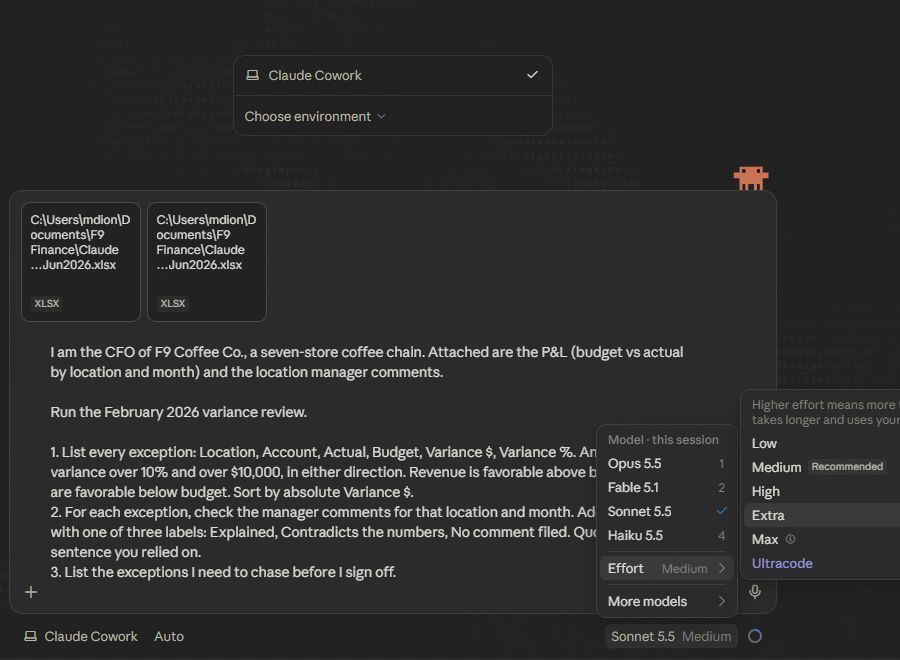
The same review on Fable and on Sonnet
I ran the February variance review on Fable 5.1 at high effort first. Here’s the prompt.
I am the CFO of F9 Coffee Co., a seven-store coffee chain. Attached are the P&L (budget vs actual by location and month) and the location manager comments.

Run the February 2026 variance review.

1. List every exception: Location, Account, Actual, Budget, Variance $, Variance %. An exception is a variance over 10% and over $10,000, in either direction. Revenue is favorable above budget, costs are favorable below budget. Sort by absolute Variance $.
2. For each exception, check the manager comments for that location and month. Add a column with one of three labels: Explained, Contradicts the numbers, No comment filed. Quote the sentence you relied on.
3. List the exceptions I need to chase before I sign off.
It took about four minutes and came back with a lot: the table, the math, extra checks, data quality flags, and a markdown file I hadn’t asked for.
Then I opened a new chat, switched to Sonnet 5.5 on high effort, attached the same files and sent the same prompt. It came back in 59 seconds with the same exceptions in the same order. I liked its formatting a little better.

On Anthropic’s price list, a Sonnet 5.5 token costs a fifth of a Fable 5.1 token (as of October 2026), and Sonnet wrote less for the same job, so the gap on this review was bigger than the rate card alone.
This job is looking up numbers, doing comparison math and reading comments. There’s not much high-level reasoning in it, so the top model was overpowered for it. Save the big model for the work where being wrong is expensive: a judgment call on a reserve, a tricky consolidation.
The smaller models are faster as well as cheaper. When you don’t need the power, there’s no benefit to paying for it.
Way 2: turn the job into a skill
Next month, most of us scroll back up, copy the prompt, paste it again, and then fix the three things that drifted. That rework is where a lot of tokens go.
A Claude skill is a saved set of instructions Claude picks up on its own when your request matches it. Skills are plain markdown files, which is a stripped-down text format, about as light as a document gets. You don’t have to write one. You can ask Claude to build it from the work you just did.
I want to create a skill called monthly-variance-review from what we just did.

It should run this exact review for whatever month I name: the exception table from the P&L, the comment check with the three labels and the quoted sentence, then the chase list. Same rule: over 10% and over $10,000, either direction.

The description should say to use it whenever I ask for a monthly variance review, a budget vs actual review, or name a month and say "review".

Keep the skill short. Do not copy any P&L data into it.
That last line matters. The skill tells Claude how to do the work. What to do it on and when is up to your files and to you.
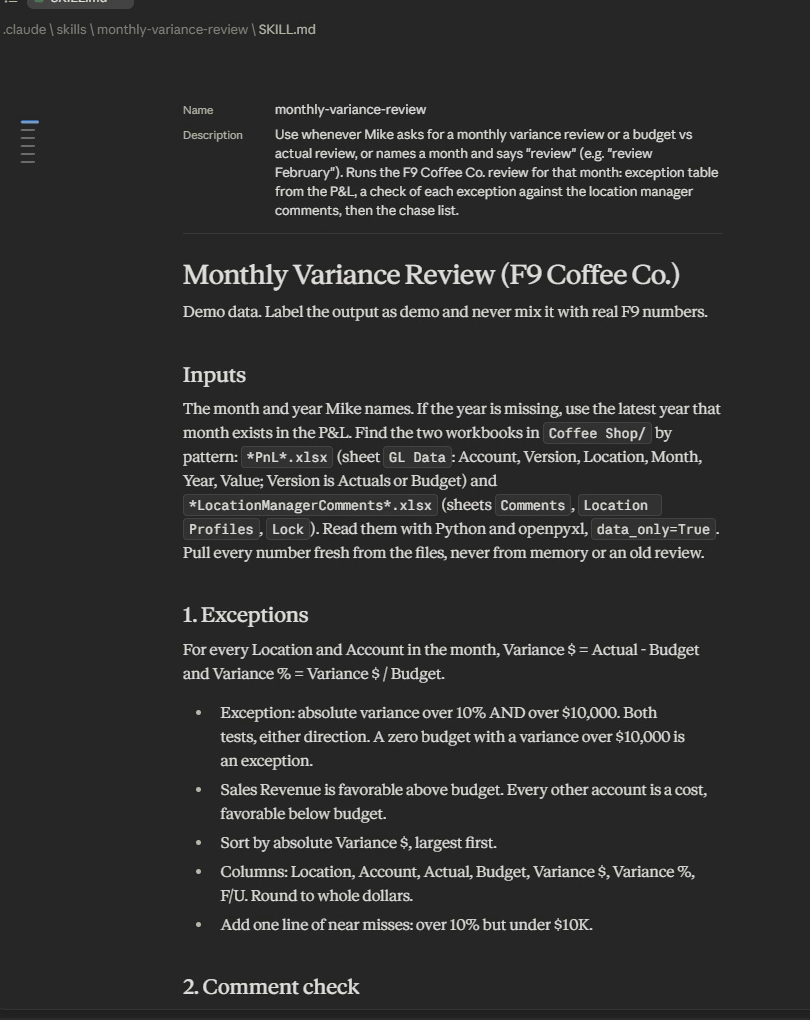
The skill came back in about 30 seconds. Then I typed “review March” and it ran the whole review from two words.
Why a skill costs almost nothing until you use it
Until a skill is triggered, only its name and its one-line description sit in Claude’s context, about 100 tokens per skill according to Anthropic’s Agent Skills documentation. The full instructions load only when a request matches. You can keep a shelf of them without paying for the shelf.
Way 3: manage the context window
The context window is everything Claude is holding while it works: your messages, its replies, connector and system tools, skills, memory files. All of it gets sent again with every message.
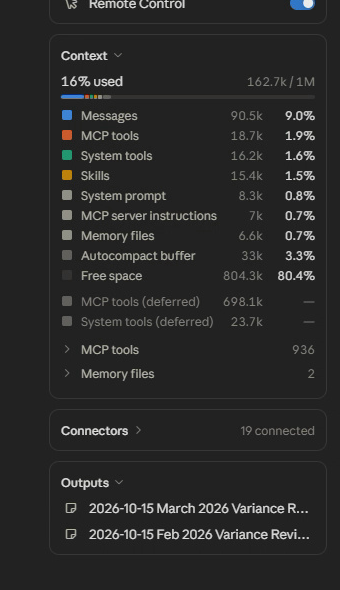
In Claude Code you can see the breakdown. At the point I checked, messages alone were about 91,000 tokens of the total. The window goes up to 1 million tokens, which sounds like a lot of headroom, but every one of those tokens is paid for on every send. Long contexts cost accuracy too: the Lost in the Middle study found models use information buried in the middle of a long prompt less reliably.
New work goes in a new chat
When the review was done, I didn’t need any of it again for April. So I ran April two ways:
| Context sent with the April request | |
|---|---|
| Same chat as March | about 173,000 tokens |
| Fresh chat | about 143,000 tokens |
That’s about 30,000 fewer tokens on every message, and the gap compounds with every follow-up. My rule: new task or new month, new chat. If I’m scrolling to find something, the thread is too long.
Compact what you have to keep
When you do need to stay in a long chat, Claude Code has a /compact command. It summarizes the conversation so far and keeps the essentials. Tools and system files don’t shrink; the messages do. Mine went from about 173,000 tokens to about 122,000.

The same habit matters in Claude Cowork, where long agentic sessions build context quickly. On Opus or Fable the context fills much faster, because those models produce more. I compact roughly every seven or eight sessions on them. That’s one more reason to pick the right model in the first place: the five ways stack.
Free AI Library
Take the skill from this post
Every prompt here, plus the finished monthly-variance-review skill with its output rules and Python script, is in my AI Library. You also get Finance AI Insider, my free weekly newsletter on AI for finance pros.
Way 4: cap the output
This is the half of the bill nobody looks at. Everything Claude writes back is billed, and at five times the input rate.
Look at a normal answer and count what you didn’t ask for: the lead-in, the method notes, the recap, the offer to do more. You read none of it and paid for all of it. So I added output rules to the skill.
Update the monthly-variance-review skill with output rules:

- Return the exception table and the chase list. Nothing before, between or after them.
- No method notes, no recap, no offers to do more.
- Quoted comment sentences: 25 words maximum.
- Chase list: one line per item, 15 words maximum.
- If there are no exceptions, say "No exceptions" and stop.
Then I asked for April again. It came back as the table and the chase list, with no markdown file written alongside. The output was half the size or less, and the context only climbed to about 130,000 tokens, against 140,000 to 150,000 before.

Output rules work like briefing an analyst. Say what to return, give the word limits, and say when to stop.
Way 5: have Claude write the script once
The exception table is arithmetic. Same rule, same file layout, every month. There is one right answer, and a language model has no business re-reasoning it each time.
This is the split between deterministic and probabilistic work. Deterministic work has one fixed answer: one plus one is two, and February either breaches the threshold or it doesn’t. Probabilistic work is where reasonable people disagree: whether a manager’s comment really explains a variance. Put the deterministic part in code and keep the AI on the judgment.
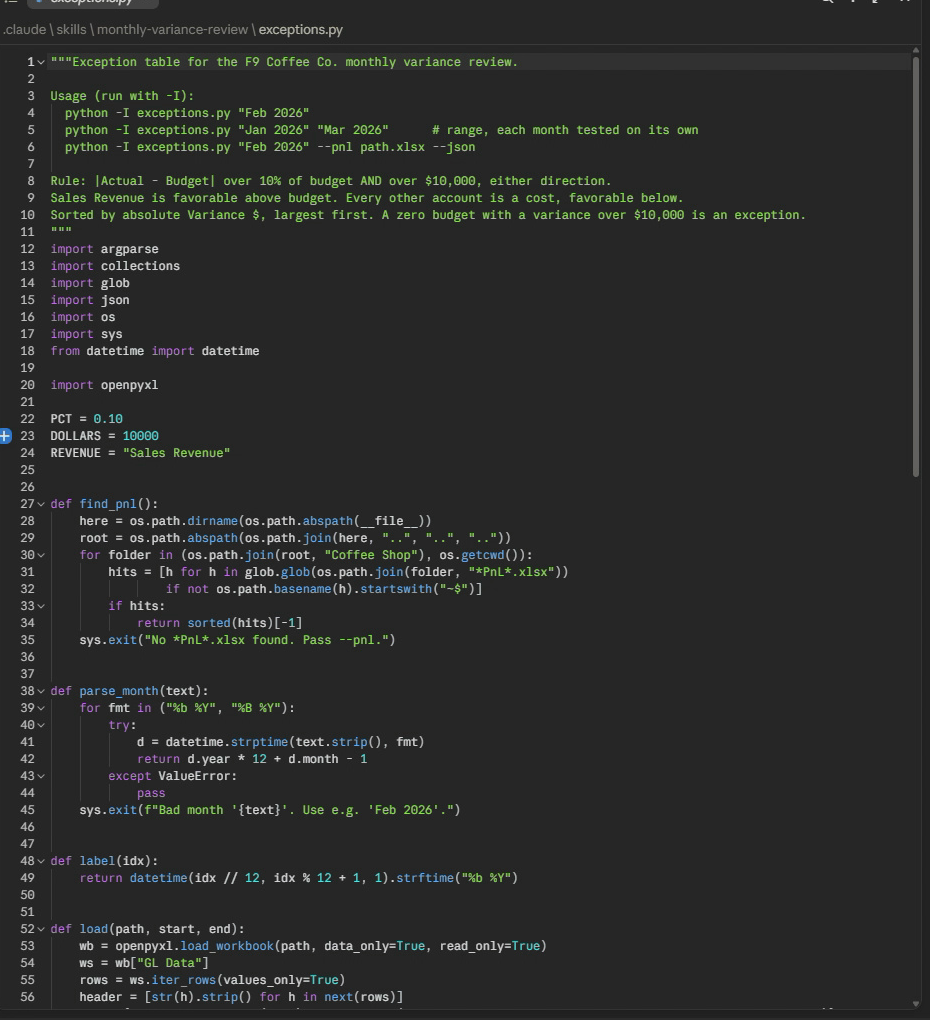
So I asked Claude to write the code and put it inside the skill. Python is a programming language that’s good at exactly this kind of table work. You don’t need to know it. Claude writes it.
Update the monthly-variance-review skill one more time.

Write a Python script and bundle it in the skill. The script reads the P&L file and returns the exception table for any month or range of months, using the same rule: over 10% and over $10,000, either direction, revenue favorable above budget, costs favorable below.

Change the skill so it always runs the script for the table and never recalculates variances itself. It should only read the manager comments for the rows the script flags.

Test the script on February 2026 and tell me the exception count.
The test came back with 10 exceptions for February, the same as both earlier runs. When a skill runs a script, the code itself never loads into the context. Only what it prints comes back.
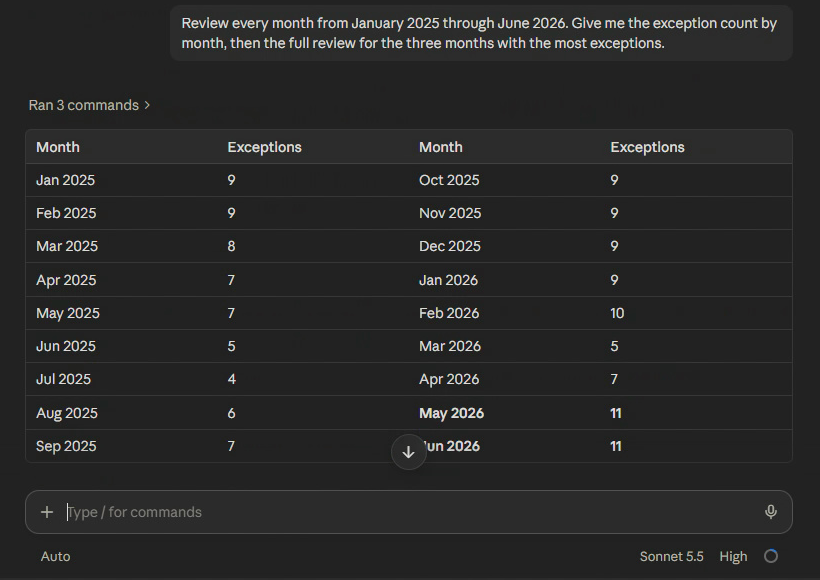
Then I asked for every month at once, January 2025 through June 2026, 18 months in one request. It calculated every month, read comments only for the months that mattered, and returned the three worst months in full, in about a minute and a half. The context window barely moved and stayed well below the 173,000 tokens the long chat had reached.
What this looks like at team scale
Everything above works for one person. If you own the AI budget, there are levers that do it for the whole team, and they matter more as AI agents for finance take on longer jobs. These are Enterprise admin controls as of October 2026, so check what your plan shows.
- Default model and effort. Admins can set the organization’s default model and cap effort levels by role. Anthropic’s own advice to admins is to start on Sonnet. A default nobody chose is the first thing to check.
- Spend limits. Limits at organization, group and individual level, with alerts at 75% and 90% of an org-level limit.
- Cost per skill. Enterprise analytics shows cost per use for each skill, which makes a skill the first unit of AI spend you can measure.
- Organization instructions. Output rules written once at the org level apply to every seat. Anthropic’s Enterprise consumption guide covers all four.
On a Team plan the caps are per seat, and owners can buy usage credits and set spend caps. Past a seat’s included usage, credits bill at API rates.
Where this approach falls short
- A lighter model makes more judgment mistakes. On the variance numbers Sonnet matched Fable. On reading a manager’s comment against the numbers, a lighter model is more likely to call something explained when it isn’t. Check one row every time.
- The usage meter is coarse on personal plans. On Max the Usage page shows percentages, and one prompt may not move them. Claude Code’s context breakdown is a far better instrument.
- Skills don’t sync between surfaces. A skill built in Claude Code lives in a folder on your machine. A skill in the Claude app lives in your account. Build it where you’ll run it.
- A script is only as good as its rule. If your threshold changes, the script has to change with it. Ask Claude to update and re-test it, and check one month you already know.
Common issues
The skill doesn’t trigger when I ask for a review
The description decides whether a skill fires. Ask Claude to tighten it: “Update the description so it triggers when I name a month and say review.”
The skill came back long and full of my data
Ask for half the length and no data in the skill. A bloated skill costs tokens every time it runs.
The script can’t find my file
In the Claude app, a skill’s script may not be able to read files stored in a Project. Attach the file to the chat, or run the job in Claude Code on a folder that holds it.
Claude recalculates the variances instead of running the script
Edit the skill so it always runs the bundled script for the table and never computes variances itself.
Cost and access
As of October 2026, from Anthropic’s pricing page and help center:
- Enterprise: $20 per seat per month billed annually, 20-seat minimum, plus all usage at standard API rates from the first token, with no included allowance.
- Team: Standard seats at $20 a month billed annually ($25 monthly) and Premium seats at $100 annually ($125 monthly), each with a per-seat usage cap.
- API rates per million tokens, input / output:
| Model | Input | Output |
|---|---|---|
| Haiku 5.5 | $0.10 | $0.50 (prompts up to 100K tokens) |
| Sonnet 5.5 | $2 | $10 |
| Opus 5.5 | $4 | $20 |
| Fable 5.1 | $10 | $50 |
Skills, the context breakdown and /compact are included on paid plans. Prices and plan names change often, so check Anthropic’s pricing page before you build a budget around them.
The prompts from this post and the finished monthly-variance-review skill, output rules and script included, are in my free AI Library.